What robotic arm programming software cuts setup time
Publication Date
author
For operators under pressure to shorten changeovers and keep cells running, choosing the right robotic arm programming software can make the difference between hours of setup and minutes of production readiness. This article cuts through vendor claims to examine what actually reduces setup time—from intuitive teach tools and offline simulation to reusable templates, error-proof workflows, and real-world integration factors that matter on the factory floor.
Why a checklist matters when selecting robotic arm programming software
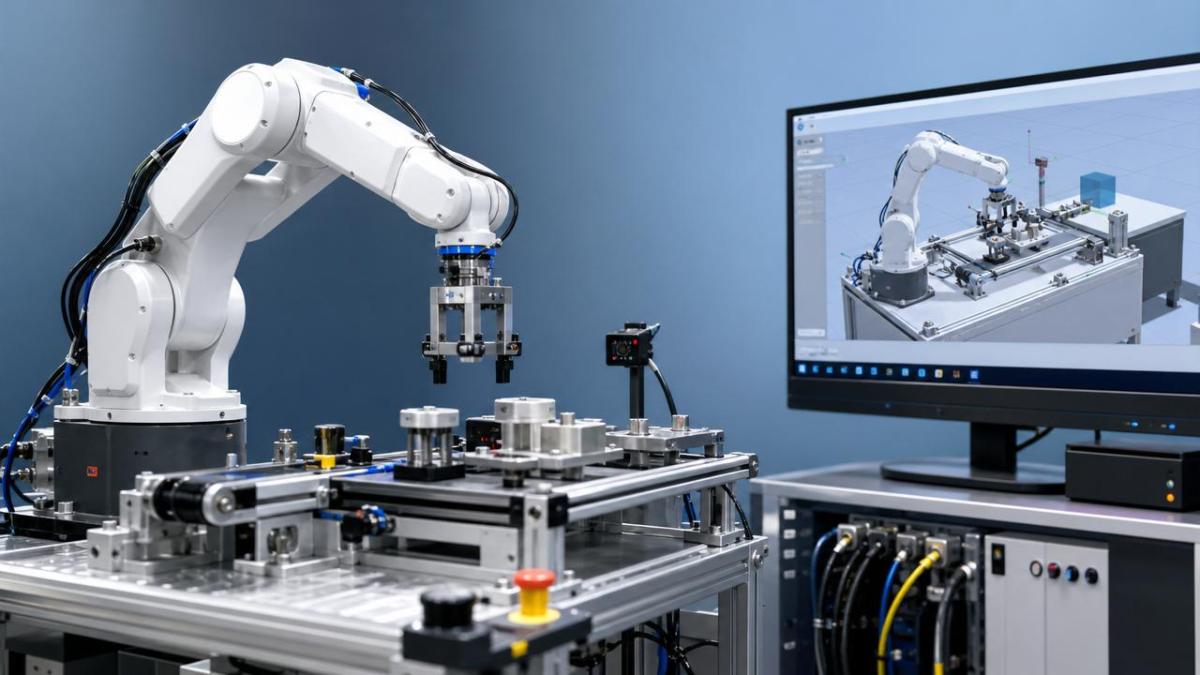
Setup time is rarely lost in one place. It disappears across jogging, calibration, I/O mapping, collision recovery, recipe loading, and handoff between engineering and production.
That is why robotic arm programming software should be judged as a workflow tool, not just a code editor. Fast setup depends on fewer manual steps, fewer errors, and faster validation.
A checklist-based review also helps compare industrial robot software across brands, cell sizes, and process types. It keeps attention on measurable time savings instead of polished demos.
Core checklist: what robotic arm programming software cuts setup time
- Prioritize intuitive teaching tools that let users jog, record points, adjust frames, and modify paths quickly without deep syntax knowledge or repeated menu switching.
- Choose offline programming software with accurate digital twins, so paths, reach, cycle timing, and collision zones can be validated before touching the live cell.
- Verify reusable templates for pick-and-place, palletizing, welding, dispensing, and machine tending, because prebuilt logic removes repetitive coding during every product changeover.
- Check drag-and-drop workflow support for I/O mapping, sensor triggers, gripper actions, and safety interlocks, reducing hand-coded setup mistakes and troubleshooting delays.
- Demand fast frame and tool calibration wizards, since robotic arm programming software often loses time when TCP, base, or fixture references require manual re-entry.
- Confirm recipe and job version control, allowing validated parameter sets, coordinates, and process data to be recalled instantly during SKU changes or repeat orders.
- Evaluate simulation-to-controller consistency, because setup time grows when programs behave differently on the robot than they did in the virtual environment.
- Look for built-in error diagnostics that pinpoint singularities, unreachable points, I/O faults, and collision risks before operators spend time tracing root causes manually.
- Assess integration with PLCs, MES, vision systems, and fieldbus networks, since robotic arm programming software should reduce handoff work across the broader automation stack.
- Measure how quickly a new user can complete a real setup task, because usability on the plant floor matters more than feature depth on a vendor comparison sheet.
Features that usually deliver the biggest time savings
Offline simulation is often the largest lever. It shifts trial-and-error away from production hours and reduces risk during fixture changes, line balancing, and robot redeployment.
Template-based programming is the second major lever. When robotic arm programming software stores proven motion blocks, process sequences, and safety logic, setup becomes a configuration task.
Calibration speed is the third lever. If tool center point updates, work object alignment, and vision offset adjustments are slow, setup time expands despite advanced programming features.
How the answer changes by application
High-mix machine tending
In machine tending, robotic arm programming software should make part family changes simple. Fast gripper setup, fixture offsets, and job recipes matter more than advanced path shaping.
Software with barcode-linked recipes, PLC handshake templates, and quick door or chuck timing adjustments usually cuts the most setup time in these cells.
Palletizing and packaging
Here, the best robotic arm programming software emphasizes pattern generators, carton libraries, slip-sheet logic, and height recalculation. Users should not need to rebuild stacking logic each run.
Visual interfaces are especially valuable in packaging. They shorten line restarts when product dimensions, pack counts, or infeed spacing change during a shift.
Welding, dispensing, and finishing
Process-intensive applications need more than easy teaching. Robotic arm programming software must support path smoothing, speed tuning, weave control, and coordinated process parameters.
Offline path validation helps, but setup time also depends on quick touch-up tools. Small corrections should be made without rewriting long motion sequences.
Vision-guided picking
For vision cells, software integration quality becomes decisive. Camera calibration, coordinate transforms, and exception handling should be native, not patched together through custom scripts.
The most effective robotic arm programming software in this scenario reduces commissioning friction between robot, camera, lighting, and conveyor tracking logic.
Common blind spots that quietly extend setup time
A polished interface can hide weak controller execution. If downloaded programs require frequent touch-up, the software is not truly saving setup time.
Poor file management is another hidden cost. Without clear versioning, teams waste time comparing backups, restoring jobs, and verifying the active robot program.
Licensing complexity also matters. If offline programming, simulation, and connector modules are sold separately, implementation may stall despite strong base functionality.
Do not ignore training burden. Robotic arm programming software that appears powerful but requires specialist knowledge can increase dependence on a few internal experts.
Finally, check recovery workflows. After an e-stop, collision, or part jam, quick restart guidance often saves more time than one extra programming feature.
A practical evaluation method before committing
- Define one representative setup task, such as a fixture change, new SKU introduction, or path modification after a tooling adjustment.
- Time each step from file selection to first good cycle, separating programming, calibration, validation, and restart actions.
- Test robotic arm programming software with actual peripherals, including grippers, vision, PLC tags, and safety devices used in production.
- Record intervention count, because fewer corrections usually predict shorter real-world setup windows than raw cycle-speed claims.
- Score usability for both routine edits and fault recovery, since setup time includes getting back to production after small disruptions.
Simple comparison table
What to do next
The best robotic arm programming software is not the one with the longest feature list. It is the one that removes steps, standardizes repeat tasks, and shortens recovery after interruptions.
Start with a setup-time map of one real cell. Then test software against that map using offline programming accuracy, calibration speed, template reuse, and integration readiness as decision anchors.
For hard-tech operations focused on engineering truth, that approach produces cleaner comparisons and faster deployment. In practice, robotic arm programming software cuts setup time when it converts expert knowledge into repeatable, low-error workflows.
Use this checklist to narrow options, run a timed pilot, and select the platform that reaches first good part with the fewest manual interventions.
Search News
Hot Articles
- Carbon Fiber StructuresHow to Specify Aerospace Carbon Fiber Assemblies for Lightweight, Load-Bearing PartsJul 11, 2026
- Machine VisionXiaomi, Alibaba DAMO Academy Drive Open-Source Robotics Model Ecosystem, Lowering Algorithm Development Barriers for Overseas SMEs Adopting Chinese Robotics SolutionsMar 30, 2026
- Cobots & ArmsShanxi 'AI+' Conference Showcases Embodied Intelligence with Multinational Buyer Engagement: Key Industry ImplicationsMar 30, 2026
Popular Tags
Recommended News
 Jul 11, 2026How to Specify Aerospace Carbon Fiber Assemblies for Lightweight, Load-Bearing PartsAerospace carbon fiber assemblies: learn how to specify laminate design, load data, joining methods, and inspection controls for lighter, reliable load-bearing aerospace parts.Elena Rostova (UAV Systems Researcher)
 Mar 30, 2026Xiaomi, Alibaba DAMO Academy Drive Open-Source Robotics Model Ecosystem, Lowering Algorithm Development Barriers for Overseas SMEs Adopting Chinese Robotics SolutionsXiaomi & Alibaba DAMO Academy's open-source robotics models lower algorithm barriers for global SMEs. Boost efficiency in manufacturing, logistics & smart retail with ROS 2 compatible solutions.TSV Data Lab
 Mar 30, 2026Shanxi 'AI+' Conference Showcases Embodied Intelligence with Multinational Buyer Engagement: Key Industry ImplicationsShanxi 'AI+' Conference highlights embodied intelligence with Tesla, Ubtech & Jiantao showcasing multimodal robotics. 40+ global buyers validated tech on-site, creating new B2B channels for industrial automation & AI solutions.Chen Wei (Automation Lead Engineer)
 Mar 30, 2026Zhongguancun Unveils 6G Integrated Sensing-Computing-Intelligence Platform to Empower Embodied Robots for Global Industrial ApplicationsZhongguancun's new 6G platform revolutionizes industrial robotics with <10ms latency, empowering global automotive, logistics & port automation. Discover how this tech boosts China's smart manufacturing exports.TSV Data Lab
 Mar 30, 2026Mech-Mind Tianjin Embodied Intelligence R&D and Production Base Goes Live, Cutting Delivery Time by 20%–30% for Global Customized AMR+Vision SolutionsMech-Mind's Tianjin AMR+Vision production base cuts delivery time by 20%-30% for欧美 & Latin American markets. Discover how this PLd-certified facility accelerates customized robotics solutions for smart manufacturing and logistics.Chen Wei (Automation Lead Engineer)
 Mar 30, 2026Boao Forum Reveals 'Co-evolution of Big and Small Brains' Trend in Humanoid Robots, China's Embodied Intelligence Accelerates Adaptation to Overseas Manufacturing Service ScenariosDiscover how China's humanoid robots, featuring 'Co-evolution of Big and Small Brains,' are revolutionizing global manufacturing. Learn about Embodied Tian Gong 3.0's ISO compliance and overseas deployment at Boao Forum 2026.Chen Wei (Automation Lead Engineer)
 Mar 30, 2026China Railway Industrial Secures Patent for Embodied Robotics in Material Handling, Boosting High-Precision Delivery Capabilities for Overseas Infrastructure and Manufacturing ProjectsChina Railway Industrial's new patent for embodied robotics in material handling boosts high-precision delivery for global infrastructure & manufacturing. Discover how this innovation enhances logistics accuracy in automotive, rail transit & EPC projects.Chen Wei (Automation Lead Engineer)
 Oct 08, 2026How to Machine Inconel 625 Blades Without Heat Cracks or Edge ChippingInconel 625 blade machining guide: prevent heat cracks, edge chipping, chatter, and work hardening with proven tooling, cooling, fixturing, and inspection strategies.Dr. Marcus Vance
 Oct 07, 2026How to Evaluate an HMI Panel Distributor for Industrial Automation ProjectsHMI panel distributor evaluation guide: verify technical compatibility, traceability, supply reliability, lifecycle support, and total cost for automation projects.Victor Lin (Chief Software Architect)
 Oct 06, 2026Navigation Fault Tolerance Standards for AMRs: What Safety Teams Must VerifyNavigation fault tolerance standards: learn what AMR safety teams must verify, from localization loss and sensor faults to stopping distance, safe restart, and site-specific validation.Chen Wei (Automation Lead Engineer)
 Oct 05, 2026Calculating Edge Computing Total Cost of Ownership Across Distributed SitesEdge computing ownership cost explained: calculate deployment, energy, connectivity, security, remote support, and refresh costs across distributed sites.TSV Data Lab
 Oct 04, 2026CAD/CAM Benchmarking in the GCC: What Manufacturers Should Ask a ConsultantCAD CAM benchmark consultant GCC guide: learn the key questions manufacturers should ask to validate post-processors, workflows, machine performance, and production risk.Victor Lin (Chief Software Architect)
 Oct 03, 2026Selecting Automotive Radar Sensor Modules for ADAS Range, Resolution, and IntegrationAutomotive radar sensor module selection guide for ADAS: compare range, resolution, field of view, latency, and integration to build safer, reliable vehicle systems.TSV Data Lab
 Oct 02, 2026How to Qualify Machined Parts Suppliers for Hard Tech ProgramsHard tech supply chain machined parts demand rigorous supplier qualification. Learn how to assess capability, traceability, quality controls, and delivery resilience.Dr. Marcus Vance
 Oct 01, 2026How to Select an Outdoor Security Radar Sensor for Perimeter Detection?Outdoor security radar sensor selection guide: compare range, accuracy, false-alarm control, integration, and field testing for reliable perimeter detection.TSV Data Lab
 Sep 30, 2026How to Evaluate Solid-State LiDAR Hardware for Outdoor Autonomous VehiclesSolid state LiDAR hardware evaluation guide for outdoor autonomous vehicles—compare range, point-cloud quality, environmental resilience, integration, and safety.TSV Data Lab
 Sep 29, 2026ISO 9283 Repeatability: How to Evaluate Cobot Positioning PerformanceISO 9283 cobot repeatability explained: learn how payload, reach, approach direction, and test conditions affect positioning performance and cell capability.Chen Wei (Automation Lead Engineer)
 Oct 09, 2026What does a manufacturing robot really cost beyond the purchase price?Manufacturing robot cost goes far beyond the purchase price. Explore integration, tooling, safety, uptime, and total ownership factors for smarter automation investments.Chen Wei (Automation Lead Engineer)
 Oct 08, 2026AGV vs. AMR: Which Is Better for Frequently Changing Routes?Which is better for changing routes? Compare AGVs and AMRs for flexible navigation, docking precision, traffic control, and faster facility reconfiguration.Chen Wei (Automation Lead Engineer)
 Oct 07, 2026How Much Does an Automated Guided Vehicle Cost in 2026?How much does an automated guided vehicle cost in 2026? Explore AGV price ranges, hidden deployment costs, and smart buying factors for stronger ROI.Chen Wei (Automation Lead Engineer)
 Oct 06, 2026Are Collaborative Robots Safe Enough to Operate Without Fencing?Are collaborative robots safe enough to work without fencing? Explore risk assessment, safeguarding options, and practical guidance for safer, productive cobot cells.Chen Wei (Automation Lead Engineer)
 Oct 05, 2026What Causes Machine Vision Systems to Miss Small Defects?What causes machine vision systems to miss small defects? Discover how lighting, optics, motion, and AI thresholds affect detection—and prevent costly escapes.TSV Data Lab
 Oct 04, 2026How Should You Compare 5-Axis CNC Machine Accuracy Claims?How do I compare 5-axis CNC machine accuracy claims? Learn how to assess standards, thermal stability, TCP accuracy, and real-world test evidence.Dr. Marcus Vance
 Oct 03, 2026Is Edge Computing Necessary for Real-Time Quality Inspection?Is industrial edge computing necessary for real-time quality inspection? Explore how latency, data volume, reliability, and control integration shape the right architecture.TSV Data Lab