What a fanless PC thermal dissipation test should prove
Publication Date
author
A credible fanless PC thermal dissipation test should do more than confirm basic operation—it must prove stable temperatures, predictable performance, and safety margins under sustained real-world loads. For quality control and safety evaluation, this is where marketing language stops and engineering evidence starts. A useful fanless PC thermal dissipation test reveals whether passive cooling can protect reliability, preserve component life, and support deployment without hidden thermal failure modes.
What should a fanless PC thermal dissipation test actually prove?
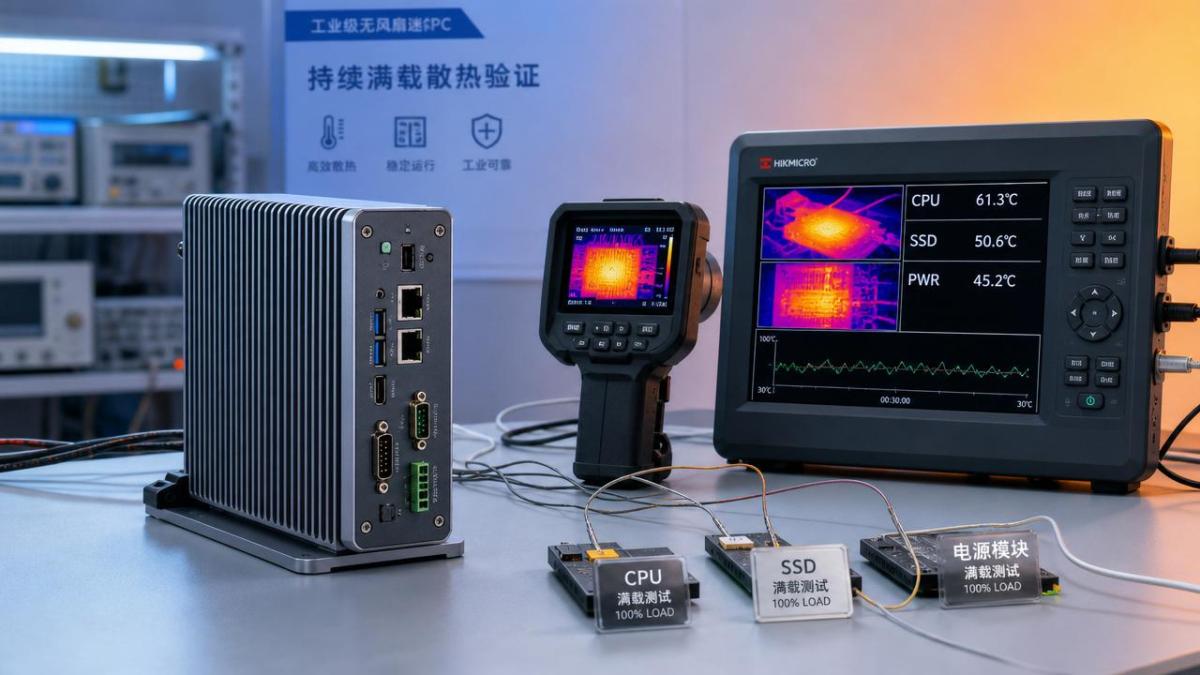
At minimum, a fanless PC thermal dissipation test must prove thermal control, performance consistency, and safety margin under sustained operation.
Basic boot success is not enough. A system may run briefly, yet still fail under prolonged heat saturation.
The test should show how heat moves from CPU, VRM, storage, and memory into the chassis and ambient air.
A strong result includes stable core temperatures, limited hotspot growth, and no dangerous enclosure temperatures during steady-state load.
It should also confirm that thermal throttling is predictable, controlled, and preferably absent in the intended workload window.
For industrial and edge deployments, proof must extend beyond the processor. SSD endurance and power-stage temperatures matter greatly.
In TSV-style evaluation, the central question is simple: does the data confirm engineering truth under repeatable conditions?
- Can the unit reach thermal equilibrium without instability?
- Does performance remain within a defined tolerance band?
- Are surface temperatures safe for the installation context?
- Do internal components stay below rated limits?
- Is the result repeatable across ambient conditions?
Which test conditions make a fanless PC thermal dissipation test credible?
Credibility depends on methodology. A fanless PC thermal dissipation test means little if load, ambient temperature, and mounting method are vague.
Passive systems are highly sensitive to orientation, enclosure contact, and surrounding airflow restrictions.
Testing on an open bench often exaggerates cooling performance. Real installations usually trap heat and reduce convection.
Key conditions that should be documented
- Ambient temperature range, such as 25°C, 35°C, and 45°C
- System orientation: horizontal, vertical, wall-mounted, or DIN-rail mounted
- Workload profile: CPU-only, mixed CPU-GPU, storage-heavy, or network-intensive
- Test duration long enough to reach steady-state saturation
- Instrumentation points for cores, SSD, VRM, chassis, and inlet air
A serious fanless PC thermal dissipation test should include both synthetic loads and realistic application loads.
Synthetic stress reveals worst-case boundaries. Real software shows whether field performance stays stable in deployment conditions.
Repeatability matters too. Three similar runs are more trustworthy than one isolated result.
How do you judge whether temperatures and performance are truly acceptable?
Acceptable does not mean merely below shutdown temperature. It means thermally sustainable with practical safety margin.
A fanless PC thermal dissipation test should track peak, average, and steady-state values instead of reporting only one maximum number.
The most useful data combines temperature curves with clock frequency, power draw, and application latency.
If the CPU remains under limits but repeatedly drops frequency, the thermal design may still be insufficient.
Indicators of a healthy result
- Temperature plateaus instead of continuous upward drift
- Clock stability during sustained workload windows
- No emergency throttling or spontaneous reboot events
- SSD and VRM values remain inside conservative operating limits
- Chassis touch temperatures fit site safety requirements
The best fanless PC thermal dissipation test also defines pass or fail thresholds before testing begins.
Without predefined criteria, conclusions become subjective and vulnerable to marketing interpretation.
What common mistakes make a fanless PC thermal dissipation test misleading?
Many thermal claims fail because the test setup hides the real thermal risk.
One common mistake is testing for too short a period. Fanless systems often heat slowly and fail late.
Another mistake is focusing only on CPU temperature. Storage and power components can be the first reliability bottleneck.
Open-air benches, low ambient temperatures, and unrealistic idle-heavy workloads also distort results.
A fanless PC thermal dissipation test becomes misleading when reviewers ignore installation details like cabinet spacing or sun exposure.
Frequent testing errors
- No steady-state hold period after reaching peak load
- No thermal imaging to identify local hotspots
- No comparison between different mounting orientations
- Ignoring dust, radiation heat, or sealed cabinet effects
- Reporting only best-case runs
Engineering-grade validation demands traceable conditions, transparent instrumentation, and failure disclosure, not selective screenshots.
When is a deeper fanless PC thermal dissipation test especially important?
Not every office device needs extreme thermal scrutiny. Harsh or mission-critical environments do.
A deeper fanless PC thermal dissipation test is especially important for edge AI, machine vision, gateways, robotics, and mobile platforms.
These use cases often combine sustained compute load, limited ventilation, and strict uptime expectations.
Thermal instability can reduce inference speed, corrupt storage behavior, or shorten electronic lifetime.
The same system may pass in a lab, then struggle inside a control cabinet beside power electronics.
Application scenarios requiring stronger evidence
- Outdoor kiosks exposed to seasonal heat swings
- Factory cells with enclosed cabinets and high radiant heat
- Vehicles and UAV ground stations with vibration and fluctuating ambient air
- Medical or aerospace support systems requiring predictable long-duration operation
In these cases, the fanless PC thermal dissipation test should be tied to mission duration, ambient envelope, and maintenance expectations.
How can results be compared and documented for faster technical decisions?
Thermal data becomes useful when it is structured for comparison, not buried in narrative claims.
A standardized summary table helps identify whether a fanless PC thermal dissipation test supports deployment readiness.
This format reduces ambiguity and supports evidence-based comparison across models, suppliers, or deployment plans.
It also aligns with TSV’s principle that parameters, thresholds, and traceability should guide technical judgment.
What is the practical next step after a fanless PC thermal dissipation test?
The next step is not simply approval. It is controlled validation against the target operating profile.
Use the fanless PC thermal dissipation test to define acceptable ambient range, installation rules, and workload boundaries.
If results are borderline, improve thermal interfaces, chassis mass, mounting clearance, or compute allocation before field rollout.
Where uptime is critical, add a pilot run in the real enclosure with continuous logging.
A trustworthy fanless PC thermal dissipation test should end with a clear statement: pass, conditional pass, or redesign required.
That level of clarity turns thermal testing from a checkbox into a decision tool.
In hard-tech environments, confidence comes from measured evidence. Review the thermal method, verify the margins, and only then scale deployment.
Search News
Hot Articles
- Carbon Fiber StructuresHow to Specify Aerospace Carbon Fiber Assemblies for Lightweight, Load-Bearing PartsJul 11, 2026
- Machine VisionXiaomi, Alibaba DAMO Academy Drive Open-Source Robotics Model Ecosystem, Lowering Algorithm Development Barriers for Overseas SMEs Adopting Chinese Robotics SolutionsMar 30, 2026
- Cobots & ArmsShanxi 'AI+' Conference Showcases Embodied Intelligence with Multinational Buyer Engagement: Key Industry ImplicationsMar 30, 2026
Popular Tags
Recommended News
 Jul 11, 2026How to Specify Aerospace Carbon Fiber Assemblies for Lightweight, Load-Bearing PartsAerospace carbon fiber assemblies: learn how to specify laminate design, load data, joining methods, and inspection controls for lighter, reliable load-bearing aerospace parts.Elena Rostova (UAV Systems Researcher)
 Mar 30, 2026Xiaomi, Alibaba DAMO Academy Drive Open-Source Robotics Model Ecosystem, Lowering Algorithm Development Barriers for Overseas SMEs Adopting Chinese Robotics SolutionsXiaomi & Alibaba DAMO Academy's open-source robotics models lower algorithm barriers for global SMEs. Boost efficiency in manufacturing, logistics & smart retail with ROS 2 compatible solutions.TSV Data Lab
 Mar 30, 2026Shanxi 'AI+' Conference Showcases Embodied Intelligence with Multinational Buyer Engagement: Key Industry ImplicationsShanxi 'AI+' Conference highlights embodied intelligence with Tesla, Ubtech & Jiantao showcasing multimodal robotics. 40+ global buyers validated tech on-site, creating new B2B channels for industrial automation & AI solutions.Chen Wei (Automation Lead Engineer)
 Mar 30, 2026Zhongguancun Unveils 6G Integrated Sensing-Computing-Intelligence Platform to Empower Embodied Robots for Global Industrial ApplicationsZhongguancun's new 6G platform revolutionizes industrial robotics with <10ms latency, empowering global automotive, logistics & port automation. Discover how this tech boosts China's smart manufacturing exports.TSV Data Lab
 Mar 30, 2026Mech-Mind Tianjin Embodied Intelligence R&D and Production Base Goes Live, Cutting Delivery Time by 20%–30% for Global Customized AMR+Vision SolutionsMech-Mind's Tianjin AMR+Vision production base cuts delivery time by 20%-30% for欧美 & Latin American markets. Discover how this PLd-certified facility accelerates customized robotics solutions for smart manufacturing and logistics.Chen Wei (Automation Lead Engineer)
 Mar 30, 2026Boao Forum Reveals 'Co-evolution of Big and Small Brains' Trend in Humanoid Robots, China's Embodied Intelligence Accelerates Adaptation to Overseas Manufacturing Service ScenariosDiscover how China's humanoid robots, featuring 'Co-evolution of Big and Small Brains,' are revolutionizing global manufacturing. Learn about Embodied Tian Gong 3.0's ISO compliance and overseas deployment at Boao Forum 2026.Chen Wei (Automation Lead Engineer)
 Mar 30, 2026China Railway Industrial Secures Patent for Embodied Robotics in Material Handling, Boosting High-Precision Delivery Capabilities for Overseas Infrastructure and Manufacturing ProjectsChina Railway Industrial's new patent for embodied robotics in material handling boosts high-precision delivery for global infrastructure & manufacturing. Discover how this innovation enhances logistics accuracy in automotive, rail transit & EPC projects.Chen Wei (Automation Lead Engineer)
 Oct 10, 2026How to Select a Machine Performance Monitoring Platform for OEE and Downtime ReductionMachine performance monitoring platform selection guide: validate machine states, OEE data, downtime reasons, integrations, and scalability to reduce losses with confidence.TSV Data Lab
 Oct 08, 2026How to Machine Inconel 625 Blades Without Heat Cracks or Edge ChippingInconel 625 blade machining guide: prevent heat cracks, edge chipping, chatter, and work hardening with proven tooling, cooling, fixturing, and inspection strategies.Dr. Marcus Vance
 Oct 07, 2026How to Evaluate an HMI Panel Distributor for Industrial Automation ProjectsHMI panel distributor evaluation guide: verify technical compatibility, traceability, supply reliability, lifecycle support, and total cost for automation projects.Victor Lin (Chief Software Architect)
 Oct 06, 2026Navigation Fault Tolerance Standards for AMRs: What Safety Teams Must VerifyNavigation fault tolerance standards: learn what AMR safety teams must verify, from localization loss and sensor faults to stopping distance, safe restart, and site-specific validation.Chen Wei (Automation Lead Engineer)
 Oct 05, 2026Calculating Edge Computing Total Cost of Ownership Across Distributed SitesEdge computing ownership cost explained: calculate deployment, energy, connectivity, security, remote support, and refresh costs across distributed sites.TSV Data Lab
 Oct 04, 2026CAD/CAM Benchmarking in the GCC: What Manufacturers Should Ask a ConsultantCAD CAM benchmark consultant GCC guide: learn the key questions manufacturers should ask to validate post-processors, workflows, machine performance, and production risk.Victor Lin (Chief Software Architect)
 Oct 03, 2026Selecting Automotive Radar Sensor Modules for ADAS Range, Resolution, and IntegrationAutomotive radar sensor module selection guide for ADAS: compare range, resolution, field of view, latency, and integration to build safer, reliable vehicle systems.TSV Data Lab
 Oct 02, 2026How to Qualify Machined Parts Suppliers for Hard Tech ProgramsHard tech supply chain machined parts demand rigorous supplier qualification. Learn how to assess capability, traceability, quality controls, and delivery resilience.Dr. Marcus Vance
 Oct 01, 2026How to Select an Outdoor Security Radar Sensor for Perimeter Detection?Outdoor security radar sensor selection guide: compare range, accuracy, false-alarm control, integration, and field testing for reliable perimeter detection.TSV Data Lab
 Sep 30, 2026How to Evaluate Solid-State LiDAR Hardware for Outdoor Autonomous VehiclesSolid state LiDAR hardware evaluation guide for outdoor autonomous vehicles—compare range, point-cloud quality, environmental resilience, integration, and safety.TSV Data Lab
 Sep 29, 2026ISO 9283 Repeatability: How to Evaluate Cobot Positioning PerformanceISO 9283 cobot repeatability explained: learn how payload, reach, approach direction, and test conditions affect positioning performance and cell capability.Chen Wei (Automation Lead Engineer)
 Oct 10, 2026When does the cost of industrial robots pay back in high-volume production?Cost of industrial robots: discover how high-volume manufacturers calculate payback through uptime, cycle time, labor, quality, and integration before investing.Chen Wei (Automation Lead Engineer)
 Oct 09, 2026What does a manufacturing robot really cost beyond the purchase price?Manufacturing robot cost goes far beyond the purchase price. Explore integration, tooling, safety, uptime, and total ownership factors for smarter automation investments.Chen Wei (Automation Lead Engineer)
 Oct 08, 2026AGV vs. AMR: Which Is Better for Frequently Changing Routes?Which is better for changing routes? Compare AGVs and AMRs for flexible navigation, docking precision, traffic control, and faster facility reconfiguration.Chen Wei (Automation Lead Engineer)
 Oct 07, 2026How Much Does an Automated Guided Vehicle Cost in 2026?How much does an automated guided vehicle cost in 2026? Explore AGV price ranges, hidden deployment costs, and smart buying factors for stronger ROI.Chen Wei (Automation Lead Engineer)
 Oct 06, 2026Are Collaborative Robots Safe Enough to Operate Without Fencing?Are collaborative robots safe enough to work without fencing? Explore risk assessment, safeguarding options, and practical guidance for safer, productive cobot cells.Chen Wei (Automation Lead Engineer)
 Oct 05, 2026What Causes Machine Vision Systems to Miss Small Defects?What causes machine vision systems to miss small defects? Discover how lighting, optics, motion, and AI thresholds affect detection—and prevent costly escapes.TSV Data Lab