When should you run a CODESYS runtime latency test?
Publication Date
author
For after-sales maintenance teams, knowing when to run a codesys runtime latency test can mean the difference between quick fault isolation and prolonged downtime. If PLC response starts drifting, edge devices lag, or field complaints increase under load, latency testing becomes a practical diagnostic step. This guide explains the right timing, warning signals, and engineering context for making reliable maintenance decisions.
What does a CODESYS runtime latency test actually tell maintenance teams?
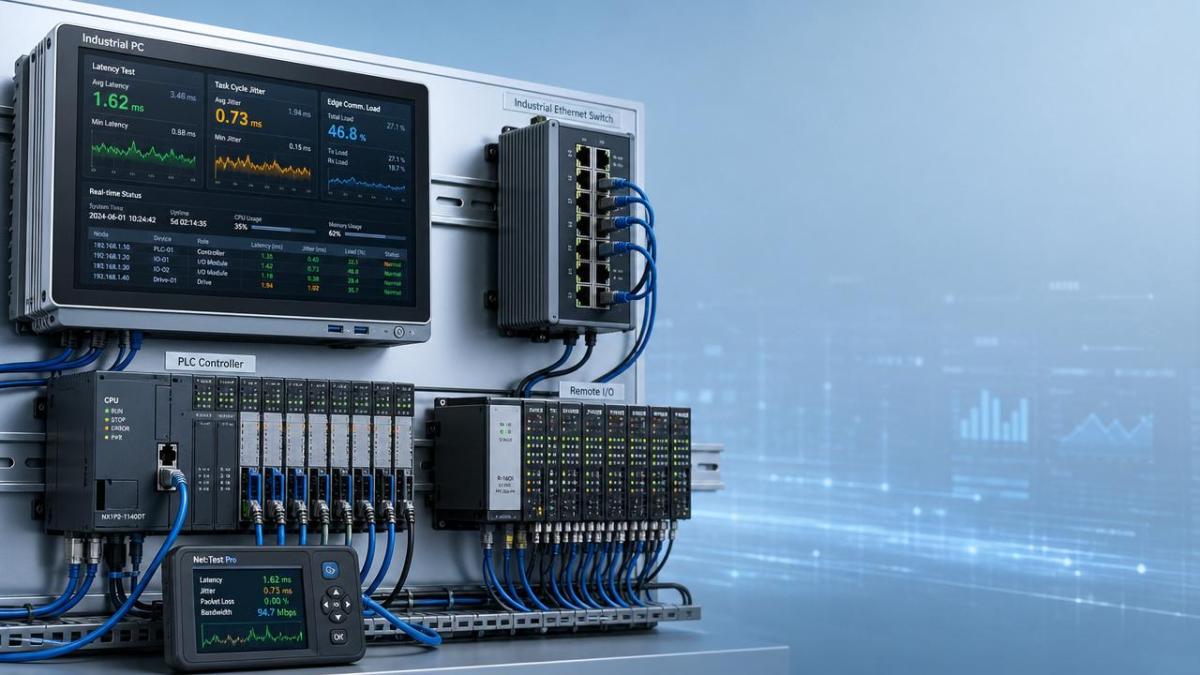
A codesys runtime latency test measures timing behavior inside a control system rather than simple device availability. It helps after-sales teams determine whether scan cycles, task execution, communication stacks, or edge workloads are introducing delays that can affect machine response.
In mixed industrial environments, latency problems rarely appear as a single alarm. They often surface as intermittent I/O lag, unstable HMI feedback, delayed actuator response, missed synchronization events, or complaints that a machine works in manual mode but becomes unreliable in automatic operation.
This is why a codesys runtime latency test matters across robotics, process skids, packaging lines, CNC support cells, AGV docking logic, and edge-connected inspection systems. The test is not only about finding a fault. It is about proving whether timing margins remain acceptable under real operating load.
- It reveals whether task jitter is growing beyond the tolerance expected by the application.
- It separates runtime timing issues from fieldbus wiring, sensor drift, or mechanical wear.
- It provides evidence for escalation when the issue involves hardware limits, virtualization overhead, or overloaded edge gateways.
Why latency matters more in modern mixed architectures
Older standalone PLC systems often had predictable timing envelopes. Newer installations combine soft PLCs, industrial PCs, virtual machines, OPC UA traffic, historian uploads, machine vision triggers, and remote service sessions. Each added layer can consume CPU time, interrupt scheduling, or create communication contention.
For teams supporting multiple sites, information noise is a real problem. Operators may report “slow PLC behavior,” yet the root cause may be a Windows update, a high-priority background process, network bursts, storage bottlenecks, or an application task designed with poor priority balance. A codesys runtime latency test turns vague complaints into measurable timing evidence.
When should you run a codesys runtime latency test in the field?
After-sales personnel should not wait for total failure before running a codesys runtime latency test. The best timing is usually when the system still works, but response consistency is no longer trustworthy. That window gives you repeatable data before faults become chaotic.
The following table summarizes common maintenance triggers and the diagnostic value of latency testing.
The main takeaway is simple: run the test when performance changes are repeatable but not yet catastrophic. That is the point where timing data is most useful for isolating root causes and limiting unplanned downtime.
Five practical moments that justify immediate testing
- After replacing a controller, industrial PC, network card, or storage device, because identical specifications do not guarantee identical timing behavior.
- When a customer adds vision, traceability, OPC UA publishing, MES connectors, or historian logging to an existing machine.
- When the machine behaves normally in dry cycle tests but drifts during full recipe execution with all peripherals active.
- When remote support sessions reveal CPU spikes, but no hard alarm is generated in the application.
- Before closing a recurring service ticket that has been “fixed” by rebooting more than once.
Which warning signals usually point to runtime latency rather than another fault?
Not every control issue requires a codesys runtime latency test. Maintenance efficiency improves when teams first identify the symptom pattern. Timing faults usually produce inconsistent, load-sensitive, and state-dependent behavior rather than a clean and permanent failure.
- Cycle-dependent faults: the problem appears during recipe transitions, coordinated motion, or multi-station handshakes.
- Load-dependent faults: delays increase during data logging, camera triggers, or remote diagnostics.
- Recovery after restart: temporary improvement occurs after reboot, then degrades again as runtime load accumulates.
- Cross-domain symptoms: operators blame mechanics, electricians suspect fieldbus issues, and IT points to the network, yet no single subsystem fails permanently.
Symptoms that are often misread in service reports
A delayed output does not always mean a bad relay. A missed inspection trigger does not always mean a faulty camera. An unstable AGV docking sequence does not always mean poor localization. In many systems, the common factor is that a task or communication thread is no longer meeting its intended execution window.
TSV’s data-first perspective is useful here: maintenance decisions should rely on observable timing behavior, not marketing claims about “real-time performance.” Parameters, tolerances, and repeatability matter more than generic product language.
How should after-sales teams execute a useful codesys runtime latency test?
A useful codesys runtime latency test is not a single screenshot. It is a controlled comparison between expected timing and actual timing under defined operating states. The value comes from method, not just tools.
Recommended service workflow
- Record the complaint condition clearly, including production state, active devices, network traffic profile, and recent changes.
- Capture baseline timing during idle or reduced-load operation so you know what “normal” looks like on that installation.
- Repeat the test under real load, not only in engineering mode, because many problems appear only with all services enabled.
- Compare task cycle time, jitter, CPU utilization, communication latency, and event response sequence rather than relying on one number alone.
- Correlate timing deviations with log events, fieldbus diagnostics, HMI refresh behavior, and operating system activity if an industrial PC is involved.
When maintenance teams skip the baseline step, they often misjudge normal variation as a fault. When they skip the loaded-state step, they miss the real issue. Good testing always compares at least two operating conditions.
What data should be captured
To make the codesys runtime latency test actionable, document timing data in a way that supports escalation, spare parts decisions, and future preventive service. The table below can serve as a field checklist.
This data structure supports a more disciplined maintenance process. It also helps procurement and engineering teams decide whether the problem needs reconfiguration, hardware replacement, or architecture changes such as moving noncritical workloads off the controller platform.
How do you separate controller latency from network, hardware, and application design issues?
A codesys runtime latency test is most valuable when used together with comparative diagnosis. After-sales teams often lose time because they test everything at once. A better method is to isolate the fault domain step by step.
Comparison logic that reduces false conclusions
- If runtime jitter increases while network counters stay stable, investigate task priorities, CPU overhead, and application structure first.
- If both runtime timing and network timing degrade together only under load, inspect shared resource contention, gateway overload, or excessive edge services.
- If timing remains stable but the process still responds late, check actuator mechanics, valve response, drives, and sensor placement.
- If the issue appears only after software revision, compare task configuration, polling rates, data logging frequency, and third-party service additions.
This comparison-based approach aligns with TSV’s engineering philosophy. Instead of assuming a vendor claim or operator impression is correct, use measurable thresholds and repeatable tests to filter out noise and identify what changed in the real system.
What procurement and retrofit decisions should follow a codesys runtime latency test?
For after-sales teams, diagnostics often turn into procurement recommendations. Once a codesys runtime latency test confirms limited timing headroom, the next question is not only how to fix today’s fault, but also how to prevent repeat calls after the next feature expansion.
The table below helps translate test findings into practical retrofit and sourcing decisions.
This prevents a common service mistake: replacing components without improving timing architecture. A better spare-parts or upgrade decision should be tied to measured latency behavior, workload trend, and site expansion plans.
Questions to ask before recommending replacement
- Will the customer add more stations, traceability functions, or edge analytics within the next year?
- Is the runtime sharing resources with visualization, database logging, or remote access software?
- Does the current design leave enough deterministic margin for abnormal but realistic peak conditions?
- Would network segmentation or application restructuring solve the issue more effectively than a controller swap?
Common misconceptions about a codesys runtime latency test
“No alarm means no timing problem”
Many latency issues stay below alarm thresholds but still degrade process quality, throughput, or synchronization. Maintenance teams should not rely only on fault logs when customer complaints are repeatable.
“If the CPU is not maxed out, timing must be fine”
Average CPU usage can look acceptable while short spikes cause missed timing windows. Jitter and event timing often reveal more than average load alone.
“A faster controller automatically solves latency”
Not always. Poor task design, oversized polling, unnecessary services, and weak network architecture can follow the new hardware and reproduce the same field complaint.
“Testing in engineering mode is enough”
It is useful, but incomplete. A codesys runtime latency test should reflect real production conditions, including active recipes, communication traffic, and edge-side services that customers actually use.
FAQ for maintenance teams handling runtime timing complaints
How often should a codesys runtime latency test be performed?
It is usually event-driven rather than calendar-driven. Run it after major software changes, controller replacement, network architecture changes, feature additions, or recurring service complaints under load. For critical assets, a baseline test after stable commissioning also helps future comparison.
Is the test only relevant for high-speed machines?
No. High-speed packaging and motion systems are obvious candidates, but slower systems also suffer from timing issues when they coordinate multiple devices, recipes, or edge services. Process skids, AGV stations, inspection cells, and remote I/O heavy systems can all benefit.
What is the biggest mistake during field diagnosis?
Testing only after reboot, in a reduced-load state, or without recording recent site changes. That often hides the true source of latency and leads to repeated callbacks.
Can latency testing support supplier or retrofit evaluation?
Yes. Timing evidence can validate whether a proposed controller, industrial PC, gateway, or network redesign offers meaningful operational margin. It also supports more disciplined specification writing for future projects.
Why work with a data-driven technical partner when timing issues are hard to prove?
When the failure mode is intermittent, teams need more than generic advice. They need engineering interpretation grounded in measurable behavior. That is where TSV’s approach is different. We focus on hard parameters, benchmarking logic, and traceable evaluation rather than broad marketing claims.
For after-sales maintenance teams, this means support that can help frame the real question: is the issue caused by runtime overhead, weak architecture margin, unsuitable edge integration, communication contention, or an incorrect replacement decision? Reducing that uncertainty shortens fault isolation and improves service credibility with end users.
- Ask us to review timing-related parameters before controller or edge hardware replacement.
- Consult on product selection when adding gateways, IPCs, vision loads, or data services to an existing CODESYS-based system.
- Request guidance on delivery planning, retrofit scope, and risk points before a site shutdown window.
- Discuss certification, industrial environment constraints, and integration requirements when the project touches regulated or high-reliability sectors.
- Use TSV as a technical filter when you need benchmark-style reasoning for quotations, custom solutions, or spare-part upgrade paths.
If your team is dealing with repeated timing complaints, uncertain hardware sizing, or mixed edge-control workloads, contact us with the application profile, timing symptoms, and current architecture. We can help you clarify parameter confirmation, solution selection, retrofit priorities, delivery considerations, and quotation discussions based on engineering evidence rather than guesswork.
Search News
Hot Articles
- Carbon Fiber StructuresHow to Specify Aerospace Carbon Fiber Assemblies for Lightweight, Load-Bearing PartsJul 11, 2026
- Machine VisionXiaomi, Alibaba DAMO Academy Drive Open-Source Robotics Model Ecosystem, Lowering Algorithm Development Barriers for Overseas SMEs Adopting Chinese Robotics SolutionsMar 30, 2026
- Cobots & ArmsShanxi 'AI+' Conference Showcases Embodied Intelligence with Multinational Buyer Engagement: Key Industry ImplicationsMar 30, 2026
Popular Tags
Recommended News
 Jul 11, 2026How to Specify Aerospace Carbon Fiber Assemblies for Lightweight, Load-Bearing PartsAerospace carbon fiber assemblies: learn how to specify laminate design, load data, joining methods, and inspection controls for lighter, reliable load-bearing aerospace parts.Elena Rostova (UAV Systems Researcher)
 Mar 30, 2026Xiaomi, Alibaba DAMO Academy Drive Open-Source Robotics Model Ecosystem, Lowering Algorithm Development Barriers for Overseas SMEs Adopting Chinese Robotics SolutionsXiaomi & Alibaba DAMO Academy's open-source robotics models lower algorithm barriers for global SMEs. Boost efficiency in manufacturing, logistics & smart retail with ROS 2 compatible solutions.TSV Data Lab
 Mar 30, 2026Shanxi 'AI+' Conference Showcases Embodied Intelligence with Multinational Buyer Engagement: Key Industry ImplicationsShanxi 'AI+' Conference highlights embodied intelligence with Tesla, Ubtech & Jiantao showcasing multimodal robotics. 40+ global buyers validated tech on-site, creating new B2B channels for industrial automation & AI solutions.Chen Wei (Automation Lead Engineer)
 Mar 30, 2026Zhongguancun Unveils 6G Integrated Sensing-Computing-Intelligence Platform to Empower Embodied Robots for Global Industrial ApplicationsZhongguancun's new 6G platform revolutionizes industrial robotics with <10ms latency, empowering global automotive, logistics & port automation. Discover how this tech boosts China's smart manufacturing exports.TSV Data Lab
 Mar 30, 2026Mech-Mind Tianjin Embodied Intelligence R&D and Production Base Goes Live, Cutting Delivery Time by 20%–30% for Global Customized AMR+Vision SolutionsMech-Mind's Tianjin AMR+Vision production base cuts delivery time by 20%-30% for欧美 & Latin American markets. Discover how this PLd-certified facility accelerates customized robotics solutions for smart manufacturing and logistics.Chen Wei (Automation Lead Engineer)
 Mar 30, 2026Boao Forum Reveals 'Co-evolution of Big and Small Brains' Trend in Humanoid Robots, China's Embodied Intelligence Accelerates Adaptation to Overseas Manufacturing Service ScenariosDiscover how China's humanoid robots, featuring 'Co-evolution of Big and Small Brains,' are revolutionizing global manufacturing. Learn about Embodied Tian Gong 3.0's ISO compliance and overseas deployment at Boao Forum 2026.Chen Wei (Automation Lead Engineer)
 Mar 30, 2026China Railway Industrial Secures Patent for Embodied Robotics in Material Handling, Boosting High-Precision Delivery Capabilities for Overseas Infrastructure and Manufacturing ProjectsChina Railway Industrial's new patent for embodied robotics in material handling boosts high-precision delivery for global infrastructure & manufacturing. Discover how this innovation enhances logistics accuracy in automotive, rail transit & EPC projects.Chen Wei (Automation Lead Engineer)
 Oct 10, 2026How to Select a Machine Performance Monitoring Platform for OEE and Downtime ReductionMachine performance monitoring platform selection guide: validate machine states, OEE data, downtime reasons, integrations, and scalability to reduce losses with confidence.TSV Data Lab
 Oct 08, 2026How to Machine Inconel 625 Blades Without Heat Cracks or Edge ChippingInconel 625 blade machining guide: prevent heat cracks, edge chipping, chatter, and work hardening with proven tooling, cooling, fixturing, and inspection strategies.Dr. Marcus Vance
 Oct 07, 2026How to Evaluate an HMI Panel Distributor for Industrial Automation ProjectsHMI panel distributor evaluation guide: verify technical compatibility, traceability, supply reliability, lifecycle support, and total cost for automation projects.Victor Lin (Chief Software Architect)
 Oct 06, 2026Navigation Fault Tolerance Standards for AMRs: What Safety Teams Must VerifyNavigation fault tolerance standards: learn what AMR safety teams must verify, from localization loss and sensor faults to stopping distance, safe restart, and site-specific validation.Chen Wei (Automation Lead Engineer)
 Oct 05, 2026Calculating Edge Computing Total Cost of Ownership Across Distributed SitesEdge computing ownership cost explained: calculate deployment, energy, connectivity, security, remote support, and refresh costs across distributed sites.TSV Data Lab
 Oct 04, 2026CAD/CAM Benchmarking in the GCC: What Manufacturers Should Ask a ConsultantCAD CAM benchmark consultant GCC guide: learn the key questions manufacturers should ask to validate post-processors, workflows, machine performance, and production risk.Victor Lin (Chief Software Architect)
 Oct 03, 2026Selecting Automotive Radar Sensor Modules for ADAS Range, Resolution, and IntegrationAutomotive radar sensor module selection guide for ADAS: compare range, resolution, field of view, latency, and integration to build safer, reliable vehicle systems.TSV Data Lab
 Oct 02, 2026How to Qualify Machined Parts Suppliers for Hard Tech ProgramsHard tech supply chain machined parts demand rigorous supplier qualification. Learn how to assess capability, traceability, quality controls, and delivery resilience.Dr. Marcus Vance
 Oct 01, 2026How to Select an Outdoor Security Radar Sensor for Perimeter Detection?Outdoor security radar sensor selection guide: compare range, accuracy, false-alarm control, integration, and field testing for reliable perimeter detection.TSV Data Lab
 Sep 30, 2026How to Evaluate Solid-State LiDAR Hardware for Outdoor Autonomous VehiclesSolid state LiDAR hardware evaluation guide for outdoor autonomous vehicles—compare range, point-cloud quality, environmental resilience, integration, and safety.TSV Data Lab
 Sep 29, 2026ISO 9283 Repeatability: How to Evaluate Cobot Positioning PerformanceISO 9283 cobot repeatability explained: learn how payload, reach, approach direction, and test conditions affect positioning performance and cell capability.Chen Wei (Automation Lead Engineer)
 Oct 10, 2026When does the cost of industrial robots pay back in high-volume production?Cost of industrial robots: discover how high-volume manufacturers calculate payback through uptime, cycle time, labor, quality, and integration before investing.Chen Wei (Automation Lead Engineer)
 Oct 09, 2026What does a manufacturing robot really cost beyond the purchase price?Manufacturing robot cost goes far beyond the purchase price. Explore integration, tooling, safety, uptime, and total ownership factors for smarter automation investments.Chen Wei (Automation Lead Engineer)
 Oct 08, 2026AGV vs. AMR: Which Is Better for Frequently Changing Routes?Which is better for changing routes? Compare AGVs and AMRs for flexible navigation, docking precision, traffic control, and faster facility reconfiguration.Chen Wei (Automation Lead Engineer)
 Oct 07, 2026How Much Does an Automated Guided Vehicle Cost in 2026?How much does an automated guided vehicle cost in 2026? Explore AGV price ranges, hidden deployment costs, and smart buying factors for stronger ROI.Chen Wei (Automation Lead Engineer)
 Oct 06, 2026Are Collaborative Robots Safe Enough to Operate Without Fencing?Are collaborative robots safe enough to work without fencing? Explore risk assessment, safeguarding options, and practical guidance for safer, productive cobot cells.Chen Wei (Automation Lead Engineer)
 Oct 05, 2026What Causes Machine Vision Systems to Miss Small Defects?What causes machine vision systems to miss small defects? Discover how lighting, optics, motion, and AI thresholds affect detection—and prevent costly escapes.TSV Data Lab