Custom industrial touchscreen monitor choices that reduce downtime
Publication Date
author
For after-sales maintenance teams, every minute of unplanned downtime means higher service costs, delayed recovery, and added pressure on production continuity. Choosing the right custom industrial touchscreen monitor is not just about display size or touch response—it directly affects field reliability, replacement speed, and long-term maintenance efficiency. This article examines practical monitor choices that help reduce downtime through rugged design, interface compatibility, and easier lifecycle support.
Why does a custom industrial touchscreen monitor matter more in maintenance than in initial installation?
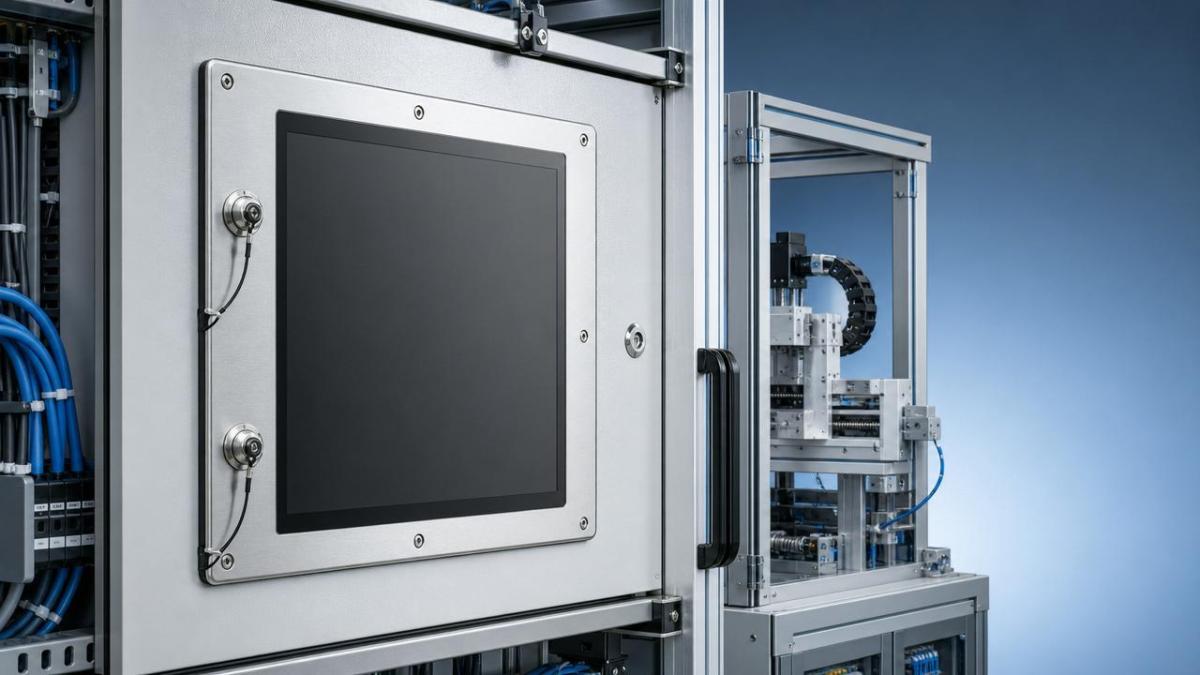
For a maintenance engineer, the real test of a display does not happen on day one. It happens after vibration, heat, dust, repeated cleaning, glove use, connector strain, and years of panel operation. In mixed industrial environments such as packaging, CNC stations, robotic cells, test benches, warehouse automation, utility control rooms, and transport equipment, a failed HMI display can stop diagnostics, slow parameter resets, and delay machine restart.
A custom industrial touchscreen monitor reduces this risk when it is specified around actual maintenance conditions rather than generic catalog language. That means matching panel cutout dimensions, mounting constraints, touch technology, I/O standards, power input range, and long-term replacement availability. For after-sales teams, the goal is simple: shorten mean time to repair, reduce adapter work, and avoid repeat site visits.
This is where TSV’s data-first approach is useful. Instead of relying on broad claims, maintenance teams need measurable details: operating temperature windows, ingress protection level, connector retention type, backlight life, EMC behavior, and whether the monitor can be supplied with stable revision control. Parameters do not just describe a screen. They define recovery speed during a fault event.
- A monitor with the wrong interface may need converters, which adds more failure points and longer troubleshooting time.
- A monitor without front-side sealing may work in a clean room but fail early in washdown or dusty production areas.
- A display with poor revision stability can force bracket changes, cable changes, or firmware retesting during replacement.
- A custom industrial touchscreen monitor aligned to the installed base can often be swapped faster with fewer field modifications.
Which monitor choices reduce downtime fastest in real service scenarios?
Not every specification affects downtime equally. After-sales maintenance personnel usually gain the biggest time advantage from four areas: mechanical fit, interface continuity, environmental durability, and supply continuity. The table below organizes the selection criteria around service impact rather than marketing categories.
The key takeaway is that a custom industrial touchscreen monitor should be chosen as a service component, not only as an operator interface. A monitor that reduces field adaptation work often saves more than a model with slightly better brightness or aesthetics but poorer replacement compatibility.
High-priority decisions for service-driven procurement
- Start from the installed machine base. Document the exact cutout, connector layout, power supply type, and touch controller used in the field.
- Separate operator preference from maintenance requirement. A larger screen is not always better if it forces cabinet changes or new brackets.
- Ask for revision control policy. A stable product family is critical when the same monitor must support years of replacement activity.
- Confirm service documentation. Pinout diagrams, mounting drawings, and interface definitions should be available before deployment.
How to compare touch technologies and enclosure designs for uptime?
After-sales teams often inherit mixed environments. Some stations require heavy glove use. Others involve moisture, grease, or cleaning agents. In those cases, the right custom industrial touchscreen monitor is not defined by touch sensitivity alone. It is defined by how consistently the panel works under maintenance reality.
The comparison below focuses on practical service tradeoffs rather than idealized lab performance.
For uptime, the choice is rarely universal. A capacitive unit may reduce front-surface cleaning issues in one line, while a resistive unit may be more practical for glove-heavy maintenance workflows. Similarly, a panel-mount sealed front monitor often lowers contamination risk, but only if the rear installation area also respects thermal and cable bend limits.
Questions maintenance teams should ask before standardizing
- Will the custom industrial touchscreen monitor respond accurately when operators or technicians wear work gloves?
- Can the front surface tolerate routine cleaning chemicals used on site?
- Does the monitor support the existing image interface without active converters?
- Is the backlight service life suitable for long-shift operation?
- Can the same platform be used across several machine families to simplify spare inventory?
What technical parameters should after-sales maintenance personnel verify first?
Many procurement teams still overemphasize screen size and brightness. Those matter, but they are not the first filters for downtime reduction. TSV’s engineering mindset favors parameters that affect fault isolation, replacement speed, and real operating endurance. A custom industrial touchscreen monitor should be evaluated with service conditions in mind.
Core parameter checklist
- Power input range: Verify whether the monitor accepts the site standard, such as regulated DC used in control cabinets. Input mismatch can create immediate deployment issues.
- Video interface continuity: Confirm whether the installed controller outputs VGA, DVI, HDMI, or DisplayPort. Avoid relying on low-cost adapters in vibration environments.
- Touch communication protocol: USB is common, but some legacy systems still depend on serial touch communication. Replacement becomes difficult when this is overlooked.
- Environmental ratings: Look at operating temperature, storage temperature, front-side sealing, and resistance to dust or fluid exposure.
- Optical behavior: High brightness is useful near windows or bright production lighting, but anti-glare surface treatment may matter just as much for readability.
- Mechanical retention: Screw-lock connectors and stable panel clamps are often more valuable than cosmetic housing features.
In sectors that overlap with robotics, motion control, edge devices, and test instrumentation, EMI resilience should also be part of the review. A monitor that performs well near variable-frequency drives, servo systems, or dense I/O cabinets helps reduce false fault diagnoses. If a display flickers or loses touch input around electrically noisy equipment, maintenance teams may waste hours investigating the wrong subsystem.
How should you balance cost, spare strategy, and lifecycle support?
The cheapest replacement monitor is often the most expensive service decision when hidden downtime costs are considered. Travel time, line stoppage, temporary adapters, engineering review, and secondary site visits can quickly exceed the unit price difference between a generic screen and a well-matched custom industrial touchscreen monitor.
The table below compares common sourcing paths from a maintenance perspective.
For many after-sales teams, the most practical model is not one universal screen for every machine. It is a controlled family of two or three standard custom configurations covering most field conditions. That approach keeps spare stocking manageable while still reducing retrofit complexity.
A practical lifecycle strategy
- Classify the installed base by interface type, cutout size, and environment severity.
- Create approved replacement groups rather than allowing one-off substitutions.
- Stock fast-moving spare monitors for critical lines with high stoppage cost.
- Document validated replacement procedures with cable routing, calibration steps, and BIOS or HMI notes where relevant.
What standards and compliance points should not be overlooked?
A custom industrial touchscreen monitor used across multiple sectors may face different internal approval requirements even when formal certification demands vary. Maintenance teams should not wait until a breakdown to discover that the replacement unit lacks the necessary electrical safety documentation, EMC evidence, or enclosure suitability for the site.
- Electrical safety documentation should match the destination market and the machine builder’s compliance process.
- EMC suitability matters when monitors operate near drives, motors, switching power systems, or radio-intensive equipment.
- Ingress protection should be checked for the actual exposure side, especially front panel use in dusty or splash-prone installations.
- Material and surface choices should align with cleaning routines where oils, coolants, or disinfectants are common.
TSV’s broader hard-tech perspective is relevant here because display selection rarely exists in isolation. In automation, edge AI, instrumentation, and precision equipment ecosystems, a monitor becomes one node in a chain of reliability. A mismatch in touch protocol, sealing, or EMI performance can affect the whole service outcome even if the panel itself powers on correctly.
Common mistakes when buying a custom industrial touchscreen monitor
Several repeat mistakes show up in field replacement programs. Most are not caused by poor intentions. They happen because the original purchase focused on commissioning, not lifecycle maintenance.
Frequent selection errors
- Choosing by diagonal size only. Two 15-inch monitors may have very different cutouts, aspect ratios, and connector positions.
- Ignoring rear-side space. A replacement may fit the front opening but fail due to cable bend radius or cabinet depth.
- Assuming all touch drivers are equally simple. Legacy operating environments may react differently to newer touch controllers.
- Treating brightness as the main indicator of field performance. Readability, anti-reflection treatment, and stable image signal often matter more.
- Overlooking long-term availability. A technically suitable monitor is still risky if supply continuity is weak.
The most effective way to prevent these mistakes is to build a replacement specification sheet based on measured field data. That includes exact dimensions, connector types, electrical conditions, touch behavior, and environmental exposure notes. This is consistent with TSV’s engineering-first view: filter out vague claims and lock decisions to verifiable parameters.
FAQ: what do maintenance teams ask most often?
How do I know whether a custom industrial touchscreen monitor is necessary?
If replacement speed, panel cutout match, legacy interface continuity, or environmental resistance are critical, customization is usually justified. It becomes especially valuable when downtime costs are high, service windows are short, or the installed machine base spans many years and inconsistent hardware revisions.
Is a standard industrial monitor enough for spare parts inventory?
Sometimes yes, especially for noncritical stations with common interfaces and flexible mounting. But when a standard monitor needs new brackets, adapters, touch conversion, or cabinet changes, the apparent savings can disappear quickly. Review total intervention time, not just purchase price.
What is the first specification to check during replacement?
Start with mechanical fit and interface compatibility. A monitor that cannot fit the existing cutout or connect directly to the host system will create immediate delays. After that, confirm power range, touch protocol, and environmental suitability.
Which environments benefit most from a rugged custom industrial touchscreen monitor?
High-vibration machinery, dusty workshops, bright production floors, transport-related equipment, utility cabinets, food-adjacent zones, and automation cells with frequent cleaning all benefit from tailored ruggedization. The exact requirement depends on front exposure, rear enclosure conditions, and operator interaction style.
Why choose us for specification review and sourcing guidance?
TechStat Vanguard approaches the custom industrial touchscreen monitor topic the same way we approach robotics, edge systems, aerospace components, and precision manufacturing benchmarks: by translating noisy claims into usable engineering decisions. For after-sales maintenance teams, that means focusing on parameters that directly affect uptime, field replacement effort, and lifecycle control.
You can contact us to discuss concrete service-side questions, including panel cutout verification, touch technology selection, legacy interface matching, replacement standardization across machine fleets, expected lead-time planning, and documentation needed for internal approval. If your challenge is comparing a custom industrial touchscreen monitor against a standard industrial alternative, we can also help structure the evaluation around downtime cost, spare strategy, and environmental risk rather than surface-level features.
For teams preparing RFQs or replacement plans, the most useful starting materials are simple: current monitor dimensions, connector photos, power input details, operating environment notes, and any recurring failure patterns. With those inputs, specification review becomes faster, clearer, and more aligned with the real objective—reducing downtime without adding hidden maintenance burden.
Search News
Hot Articles
- Carbon Fiber StructuresHow to Specify Aerospace Carbon Fiber Assemblies for Lightweight, Load-Bearing PartsJul 11, 2026
- Machine VisionXiaomi, Alibaba DAMO Academy Drive Open-Source Robotics Model Ecosystem, Lowering Algorithm Development Barriers for Overseas SMEs Adopting Chinese Robotics SolutionsMar 30, 2026
- Cobots & ArmsShanxi 'AI+' Conference Showcases Embodied Intelligence with Multinational Buyer Engagement: Key Industry ImplicationsMar 30, 2026
Popular Tags
Recommended News
 Jul 11, 2026How to Specify Aerospace Carbon Fiber Assemblies for Lightweight, Load-Bearing PartsAerospace carbon fiber assemblies: learn how to specify laminate design, load data, joining methods, and inspection controls for lighter, reliable load-bearing aerospace parts.Elena Rostova (UAV Systems Researcher)
 Mar 30, 2026Xiaomi, Alibaba DAMO Academy Drive Open-Source Robotics Model Ecosystem, Lowering Algorithm Development Barriers for Overseas SMEs Adopting Chinese Robotics SolutionsXiaomi & Alibaba DAMO Academy's open-source robotics models lower algorithm barriers for global SMEs. Boost efficiency in manufacturing, logistics & smart retail with ROS 2 compatible solutions.TSV Data Lab
 Mar 30, 2026Shanxi 'AI+' Conference Showcases Embodied Intelligence with Multinational Buyer Engagement: Key Industry ImplicationsShanxi 'AI+' Conference highlights embodied intelligence with Tesla, Ubtech & Jiantao showcasing multimodal robotics. 40+ global buyers validated tech on-site, creating new B2B channels for industrial automation & AI solutions.Chen Wei (Automation Lead Engineer)
 Mar 30, 2026Zhongguancun Unveils 6G Integrated Sensing-Computing-Intelligence Platform to Empower Embodied Robots for Global Industrial ApplicationsZhongguancun's new 6G platform revolutionizes industrial robotics with <10ms latency, empowering global automotive, logistics & port automation. Discover how this tech boosts China's smart manufacturing exports.TSV Data Lab
 Mar 30, 2026Mech-Mind Tianjin Embodied Intelligence R&D and Production Base Goes Live, Cutting Delivery Time by 20%–30% for Global Customized AMR+Vision SolutionsMech-Mind's Tianjin AMR+Vision production base cuts delivery time by 20%-30% for欧美 & Latin American markets. Discover how this PLd-certified facility accelerates customized robotics solutions for smart manufacturing and logistics.Chen Wei (Automation Lead Engineer)
 Mar 30, 2026Boao Forum Reveals 'Co-evolution of Big and Small Brains' Trend in Humanoid Robots, China's Embodied Intelligence Accelerates Adaptation to Overseas Manufacturing Service ScenariosDiscover how China's humanoid robots, featuring 'Co-evolution of Big and Small Brains,' are revolutionizing global manufacturing. Learn about Embodied Tian Gong 3.0's ISO compliance and overseas deployment at Boao Forum 2026.Chen Wei (Automation Lead Engineer)
 Mar 30, 2026China Railway Industrial Secures Patent for Embodied Robotics in Material Handling, Boosting High-Precision Delivery Capabilities for Overseas Infrastructure and Manufacturing ProjectsChina Railway Industrial's new patent for embodied robotics in material handling boosts high-precision delivery for global infrastructure & manufacturing. Discover how this innovation enhances logistics accuracy in automotive, rail transit & EPC projects.Chen Wei (Automation Lead Engineer)
 Sep 28, 2026Spindle Runout Measurement in Germany: DIN Standards, Methods, and Acceptance LimitsSpindle runout measurement Germany: explore DIN standards, proven methods, acceptance limits, and audit-ready practices for reliable machining quality.Dr. Marcus Vance
 Sep 27, 2026How to Select Wall-Mount Edge Devices for Space-Constrained Factory NetworksWall mount edge devices for space-constrained factories: evaluate workload, thermal design, power resilience, cable access, and network reliability for smarter deployments.TSV Data Lab
 Sep 26, 2026Machining Tolerance Analysis: How to Set Limits That Meet Function and Cost TargetsMachining tolerance analysis: learn how to set functional limits, control tolerance stacks, reduce inspection risk, and balance precision with production cost.Dr. Marcus Vance
 Sep 25, 2026How to Evaluate an Industrial Infrastructure Data Platform for Multi-Site OperationsIndustrial infrastructure data platform evaluation guide for multi-site operations: compare data quality, edge resilience, interoperability, governance, and scalable proof-of-value criteria.Victor Lin (Chief Software Architect)
 Sep 24, 2026How to Select Machine Vision Optics for Accurate Inspection at Different Working DistancesMachine vision optics selection guide for accurate inspection at every working distance. Compare FOV, pixel scale, DOF, distortion, lighting, and telecentric options.TSV Data Lab
 Sep 23, 2026How to Evaluate a Machine Vision System Integrator for High-Speed Inspection LinesChoose a machine vision system integrator with proven expertise in high-speed inspection, reliable reject timing, robust optics, and measurable acceptance criteria.TSV Data Lab
 Sep 28, 2026When is a SCADA API the right choice for connecting plant systems?SCADA API guide: learn when governed plant data integration improves traceability, security, and scalability—without compromising real-time control.Victor Lin (Chief Software Architect)
 Sep 27, 2026How SCADA data integration improves traceability across production linesSCADA data integration connects production-line data to improve traceability, accelerate quality investigations, and strengthen safety decisions.Victor Lin (Chief Software Architect)
 Sep 26, 2026What to define before starting SCADA integration planningSCADA integration planning starts with clear scope, control boundaries, data models, cybersecurity, and testing. Discover the definitions that reduce risk and costly rework.Victor Lin (Chief Software Architect)
 Sep 25, 2026How a smart factory with Industrial IoT reduces production blind spotsDiscover how a smart factory with Industrial IoT turns real-time machine, quality, and workflow data into actionable insights that reduce production blind spots and delivery risks.Victor Lin (Chief Software Architect)
 Sep 24, 2026When does Industrial IoT make smart manufacturing easier to scale?Smart manufacturing Industrial IoT scales when trusted data, interoperable systems, and secure workflows turn connected assets into measurable gains.TSV Data Lab
 Sep 23, 2026What drives ultra-precision machining cost at 1-micron tolerance?Ultra precision machining cost per part at 1 micron tolerance depends on process, material, metrology, and yield. Learn how to compare quotes confidently.Dr. Marcus Vance
 Sep 22, 2026Drone Engine-T550CC Applications: Build the UAV Power System Around the MissionAn application guide for Drone Engine-T550CC integration, covering payload planning, airframe matching, cooling, fuel, vibration, test procedures, documentation, and service preparation.Elena Rostova (UAV Systems Researcher)
 Sep 22, 2026How to Evaluate Industrial Edge Computing Vendors for Factory DeploymentIndustrial edge computing vendor evaluation guide for factories: compare latency, protocol fit, reliability, security, and lifecycle support before deployment.TSV Data Lab
 Sep 21, 2026Drone Payload Integration: Matching Power, Data, and Center of Gravity for Reliable FlightsDrone payload integration made practical: balance power, data, center of gravity, and endurance to build safer, more reliable mission-ready flights.Elena Rostova (UAV Systems Researcher)
 Sep 20, 2026Autonomous Navigation Pricing: Cost Drivers and Budget Benchmarks for AMR ProjectsAutonomous navigation price explained: compare AMR cost drivers, software, sensors, integration, safety, and lifecycle budgets to build a scalable project plan.Chen Wei (Automation Lead Engineer)
 Sep 19, 2026How to Scope Automation Integration Services for Multi-System Factory ProjectsAutomation integration services: learn how to scope multi-system factory projects with clear workflows, interface contracts, safety boundaries, and acceptance criteria.Victor Lin (Chief Software Architect)