Choosing a vision camera for PCB inspection without overpaying
Publication Date
author
Selecting the right vision camera for PCB inspection should be an engineering decision, not a marketing gamble. For researchers, operators, buyers, and executives comparing machine vision for defect detection, the goal is clear: secure reliable accuracy, integration stability, and long-term value without paying for unnecessary features. This guide explains how to evaluate vision camera for PCB inspection systems through real performance criteria, helping you balance inspection quality, throughput, and total cost with confidence.
The core search intent behind this topic is practical purchase guidance: readers do not want a generic explanation of machine vision cameras, they want to know how to choose a camera that is accurate enough for PCB defect detection without overspending on specifications that will not improve inspection results. That means the most useful answer is not “buy the highest resolution camera you can afford,” but “match the camera to the defect size, line speed, lighting method, optics, and integration environment.”
For most PCB inspection projects, overpaying happens in three predictable ways: buying more resolution than the defect size requires, paying for frame rates that the conveyor and processing pipeline cannot use, or selecting premium camera features that the application never activates. A good selection process starts from inspection tasks and measurable thresholds, then works backward to sensor type, resolution, shutter mode, interface, and software compatibility.
What should you define first before comparing any vision camera for PCB inspection?
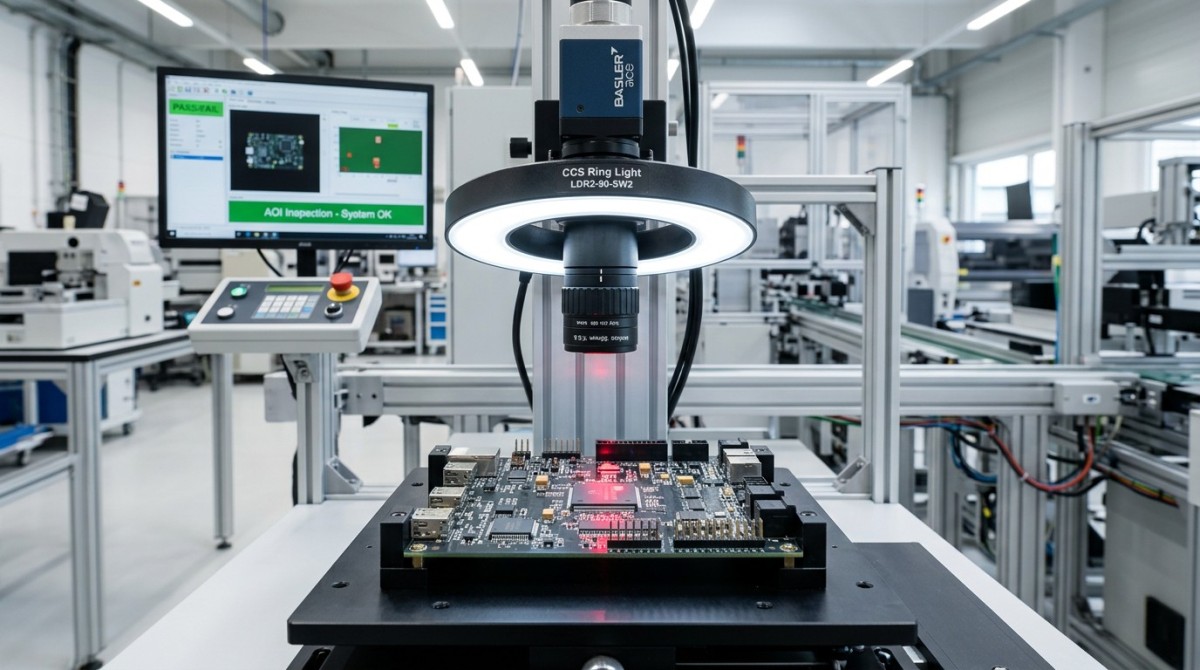
Before comparing brands or price tiers, define the inspection job in measurable engineering terms. This is the step that prevents unnecessary spending.
Start with five parameters:
- Smallest defect to detect: solder bridge, missing component, tombstoning, pad contamination, trace damage, silkscreen error, polarity issue, or micro-crack.
- Required detection confidence: whether the line can tolerate occasional misses, or whether high-risk boards require stricter thresholds.
- Field of view: full-board inspection, zone inspection, or targeted areas such as BGA, fine-pitch ICs, and connectors.
- Line speed and takt time: the camera must match throughput, not just image quality.
- Mechanical and lighting conditions: vibration, board positioning repeatability, reflective surfaces, and available illumination geometry.
If these inputs are vague, camera comparisons become distorted. For example, a procurement team may approve a high-megapixel model because it appears more future-proof, while the real bottleneck is unstable lighting or incorrect lens selection. In PCB inspection, the camera is only one part of the imaging chain. Resolution without optical quality and lighting control often adds cost without adding useful defect visibility.
How much resolution do you actually need?
Resolution is usually the first specification buyers focus on, and the most common source of overspending.
The correct question is not “What is the highest resolution available?” but “What pixel size on the board is needed to reliably detect the smallest relevant defect?” A practical rule is to allocate enough pixels across the defect so software can distinguish it from noise and process variation. In many applications, engineers aim for several pixels across the critical feature, not just one or two.
For example, if your inspection target is a 100 µm defect and your field of view covers a large PCB panel, you must calculate whether the sensor resolution can provide the required spatial sampling across that entire area. If not, you may need either:
- a higher-resolution area scan camera,
- multiple cameras covering smaller zones, or
- a line scan architecture for wide, continuous inspection.
However, higher resolution also increases:
- camera cost,
- lens quality requirements,
- data bandwidth,
- processing load,
- storage demand,
- integration complexity.
If your defects are relatively large, or inspection is limited to component presence, orientation, label verification, or gross solder issues, a mid-range sensor may perform just as well as a premium model. Paying more only makes sense if the inspection objective genuinely benefits from finer sampling.
Area scan or line scan: which architecture makes sense for PCB inspection?
For many PCB inspection systems, area scan cameras are the default choice because they are simpler to integrate, easier to trigger, and well suited for station-based imaging. They work well when the board stops at an inspection point or when multiple images can be taken in a controlled sequence.
Line scan cameras become more attractive when:
- the board or panel is large,
- continuous motion inspection is required,
- very uniform high-resolution imaging across wide widths is needed,
- you want to reduce perspective inconsistencies across the field.
But line scan systems often increase total system cost because they depend heavily on stable motion control, synchronization accuracy, and carefully designed lighting. A buyer focused only on camera price may miss these integration costs. In many PCB applications, an area scan camera with good optics and disciplined lighting delivers the best cost-performance balance.
The lower-cost option is not always the cheaper camera. It is the architecture that achieves stable inspection with the fewest compensations, rework cycles, and false calls.
Do you need monochrome or color for PCB defect detection?
Monochrome cameras are frequently the better value for PCB inspection when the task depends on contrast, edge definition, solder shape, pad integrity, and dimensional verification. They usually offer better sensitivity and can work very effectively with controlled lighting.
Color cameras are worth considering when the inspection task includes:
- color-coded component verification,
- wire or marking differentiation,
- label recognition where color matters,
- certain contamination or coating checks.
If color information does not materially improve detection performance, paying for a color camera may add processing burden without solving a real problem. In many industrial machine vision deployments, a monochrome sensor combined with the right illumination outperforms a more expensive color setup for defect reliability.
Which camera features are essential, and which ones are often overbought?
This is where cost control becomes more concrete. Some specifications are genuinely critical in PCB inspection, while others are frequently purchased “just in case.”
Features that are often essential:
- Global shutter: important when boards move or vibration exists. It avoids motion distortion.
- Stable trigger capability: critical for synchronization with conveyors, encoders, or inspection stations.
- Industrial interface compatibility: GigE Vision, USB3 Vision, CoaXPress, or Camera Link should fit system bandwidth and plant architecture.
- Good sensor dynamic range: useful for reflective pads, solder joints, and mixed-surface boards.
- Reliable SDK and software support: essential for integration and long-term maintenance.
Features that are often overbought:
- Excessively high frame rate: if the board is stationary during capture, much of that speed may never be used.
- Ultra-high resolution beyond defect requirements: this is one of the most common budget drains.
- On-camera intelligence that duplicates external processing: useful in some edge deployments, but unnecessary in many factory inspection cells.
- Extreme low-light performance: less important if the machine uses controlled industrial lighting.
- Premium ruggedization beyond actual operating conditions: valuable in harsh environments, but not always necessary in enclosed electronics inspection equipment.
A disciplined buying decision asks: will this feature measurably reduce escapes, false rejects, cycle time, or support cost? If the answer is unclear, it may be a premium feature rather than a practical requirement.
Why optics and lighting often matter more than the camera itself
Many disappointing PCB inspection results are incorrectly blamed on the camera. In reality, poor lens choice or unstable lighting is often the real cause.
For fine PCB features, optics directly affect sharpness, distortion, magnification consistency, and usable resolution across the field. A high-resolution sensor paired with a weak lens does not create a high-resolution system. Likewise, reflective solder joints and metallic pads can create glare, washout, or false contrast unless illumination is carefully engineered.
Depending on the defect type, useful lighting strategies may include:
- bright field lighting for general surface inspection,
- dark field lighting for scratches or raised defects,
- diffuse dome lighting for reflective surfaces,
- coaxial lighting for flat reflective regions,
- structured or low-angle lighting for texture and height-related visibility.
If your budget is limited, it is often smarter to avoid overspending on the camera body and reserve budget for better optics, lighting control, and mechanical stability. That allocation usually delivers better inspection performance.
How should buyers evaluate total cost instead of just purchase price?
For procurement teams and decision-makers, the camera price is only one part of the business case. The more meaningful metric is total cost of ownership.
Include these cost layers in the evaluation:
- camera hardware cost,
- lens and lighting cost,
- frame grabber or interface hardware,
- industrial PC or edge processor requirements,
- integration engineering time,
- software licensing,
- validation and tuning effort,
- maintenance and replacement risk,
- false reject cost,
- defect escape cost.
A cheaper camera can become expensive if it causes unstable inspections, frequent recalibration, limited software support, or supplier lock-in. On the other hand, a premium camera can also be wasteful if its extra capabilities never improve yield or uptime.
The best-value vision camera for PCB inspection is the one that meets defect detection requirements with the lowest full-system cost and the lowest operational risk over time.
What questions should you ask vendors before committing?
To avoid paying for marketing instead of performance, ask vendors for evidence that maps directly to your inspection environment.
- What minimum defect size can this camera resolve in the proposed field of view?
- What lens is assumed in that performance claim?
- What lighting setup was used for sample images?
- Can you provide raw images from applications similar to our PCB type and surface finish?
- What is the recommended working distance and depth of field?
- How does the system perform with reflective solder, mixed component heights, and board warpage?
- What is the real achievable frame rate at full resolution over the chosen interface?
- How mature is the SDK, and how long is product support guaranteed?
- What are the lead times, failure rates, and replacement policies?
- Can the solution scale across multiple inspection stations or lines?
These questions shift the conversation from brochure specifications to deployment reality. That is where overpayment is usually exposed.
A practical selection framework for avoiding overpayment
If you need a simple decision path, use this order:
- Define defect classes and smallest required detectable feature.
- Determine field of view and throughput target.
- Calculate required spatial resolution on the PCB.
- Choose area scan or line scan based on motion and coverage.
- Select monochrome or color only if the task justifies it.
- Match shutter mode, interface, and trigger behavior to the machine.
- Validate lens and lighting as part of the same imaging system.
- Compare vendors on image evidence, SDK maturity, and support risk.
- Evaluate full-system cost, not camera price alone.
- Run a sample-based proof of concept before final purchase.
This framework helps researchers create better specifications, operators understand real performance limits, buyers negotiate from evidence, and executives approve spending with clearer ROI logic.
Conclusion: the right camera is the one that matches the inspection task, not the biggest specification sheet
Choosing a vision camera for PCB inspection without overpaying comes down to discipline. Start with the defects that matter, the throughput you need, and the environment you actually operate in. Then select only the resolution, speed, sensor type, and interface that produce reliable inspection results in that context.
For most teams, the biggest savings do not come from choosing the cheapest camera. They come from avoiding unnecessary megapixels, inflated frame-rate requirements, and premium features that never improve yield. When camera selection is tied to defect size, optics, lighting, software stability, and total cost of ownership, you are far more likely to build a PCB inspection system that is accurate, scalable, and financially justified.
In short: buy the imaging performance you can prove you need, not the specifications you may never use.
Search News
Hot Articles
- Carbon Fiber StructuresHow to Specify Aerospace Carbon Fiber Assemblies for Lightweight, Load-Bearing PartsJul 11, 2026
- Machine VisionXiaomi, Alibaba DAMO Academy Drive Open-Source Robotics Model Ecosystem, Lowering Algorithm Development Barriers for Overseas SMEs Adopting Chinese Robotics SolutionsMar 30, 2026
- Cobots & ArmsShanxi 'AI+' Conference Showcases Embodied Intelligence with Multinational Buyer Engagement: Key Industry ImplicationsMar 30, 2026
Popular Tags
Recommended News
 Jul 11, 2026How to Specify Aerospace Carbon Fiber Assemblies for Lightweight, Load-Bearing PartsAerospace carbon fiber assemblies: learn how to specify laminate design, load data, joining methods, and inspection controls for lighter, reliable load-bearing aerospace parts.Elena Rostova (UAV Systems Researcher)
 Mar 30, 2026Xiaomi, Alibaba DAMO Academy Drive Open-Source Robotics Model Ecosystem, Lowering Algorithm Development Barriers for Overseas SMEs Adopting Chinese Robotics SolutionsXiaomi & Alibaba DAMO Academy's open-source robotics models lower algorithm barriers for global SMEs. Boost efficiency in manufacturing, logistics & smart retail with ROS 2 compatible solutions.TSV Data Lab
 Mar 30, 2026Shanxi 'AI+' Conference Showcases Embodied Intelligence with Multinational Buyer Engagement: Key Industry ImplicationsShanxi 'AI+' Conference highlights embodied intelligence with Tesla, Ubtech & Jiantao showcasing multimodal robotics. 40+ global buyers validated tech on-site, creating new B2B channels for industrial automation & AI solutions.Chen Wei (Automation Lead Engineer)
 Mar 30, 2026Zhongguancun Unveils 6G Integrated Sensing-Computing-Intelligence Platform to Empower Embodied Robots for Global Industrial ApplicationsZhongguancun's new 6G platform revolutionizes industrial robotics with <10ms latency, empowering global automotive, logistics & port automation. Discover how this tech boosts China's smart manufacturing exports.TSV Data Lab
 Mar 30, 2026Mech-Mind Tianjin Embodied Intelligence R&D and Production Base Goes Live, Cutting Delivery Time by 20%–30% for Global Customized AMR+Vision SolutionsMech-Mind's Tianjin AMR+Vision production base cuts delivery time by 20%-30% for欧美 & Latin American markets. Discover how this PLd-certified facility accelerates customized robotics solutions for smart manufacturing and logistics.Chen Wei (Automation Lead Engineer)
 Mar 30, 2026Boao Forum Reveals 'Co-evolution of Big and Small Brains' Trend in Humanoid Robots, China's Embodied Intelligence Accelerates Adaptation to Overseas Manufacturing Service ScenariosDiscover how China's humanoid robots, featuring 'Co-evolution of Big and Small Brains,' are revolutionizing global manufacturing. Learn about Embodied Tian Gong 3.0's ISO compliance and overseas deployment at Boao Forum 2026.Chen Wei (Automation Lead Engineer)
 Mar 30, 2026China Railway Industrial Secures Patent for Embodied Robotics in Material Handling, Boosting High-Precision Delivery Capabilities for Overseas Infrastructure and Manufacturing ProjectsChina Railway Industrial's new patent for embodied robotics in material handling boosts high-precision delivery for global infrastructure & manufacturing. Discover how this innovation enhances logistics accuracy in automotive, rail transit & EPC projects.Chen Wei (Automation Lead Engineer)
 Oct 27, 2026GXO and Agility Robotics Expand Partnership to Accelerate US Humanoid Robot DeploymentGXO and Agility Robotics plan to expand US humanoid robot deployment with Digit 4 in early 2027. Explore warehouse automation plans, service terms and future Digit 5 upgrades.Chen Wei (Automation Lead Engineer)
 Oct 27, 2026Robotic Automation Costs: Budgeting for Equipment, Integration, and MaintenancePlan your robotics automation cost with confidence. Explore equipment, integration, and maintenance expenses, compare quotes, and build a realistic budget for better ROI.Chen Wei (Automation Lead Engineer)
 Oct 26, 2026AMAXiMAL Releases Open-Source TopMod 3D v3 With Claude AIExplore AMAXiMAL’s free, open-source TopMod 3D v3 with Claude AI assistance, topology-based modeling and plywood fabrication tools that connect complex designs to physical builds.Dr. Marcus Vance
 Oct 26, 2026Choosing a SCADA System Integrator Company: PLC Compatibility and Long-Term SupportChoose a scada system integrator company with proven PLC compatibility and reliable long-term support. Discover what to test, compare, and require before investing.Victor Lin (Chief Software Architect)
 Oct 25, 2026Hesai Leads Global ADAS Main Lidar Shipments in Yole’s 2026 ReportHesai led global ADAS main lidar shipments with a 43% share in 2025, according to Yole’s 2026 report. Explore what this ranking reveals about its automotive market position.TSV Data Lab
 Oct 25, 2026Choosing an Aerospace Materials Manufacturer: Quality and Traceability ChecksChoosing an aerospace materials manufacturer? Learn how to verify certifications, test reports, and lot traceability to qualify suppliers confidently and reduce costly sourcing risks.Dr. Marcus Vance
 Oct 24, 2026Guotai Haitong: Global Entry-Level 3D Printer Shipments Rose 39% in Q1 2026Entry-level 3D printer shipments rose 39% in Q1 2026, Guotai Haitong reports. Explore how AI, multicolor printing and print farms are shaping market growth.Dr. Marcus Vance
 Oct 24, 2026Choosing an Industrial Vision Inspection Supplier: Acceptance Tests That MatterChoose an industrial vision inspection supplier with confidence. Discover acceptance tests for defect detection, false rejects, production speed, and reliable part rejection before you buy.TSV Data Lab
 Oct 23, 2026US Navy Raises Gecko Robotics Contract Ceiling to $300M for Robotic Fleet MaintenanceUS Navy raises Gecko Robotics’ contract ceiling to $300M for Pacific Fleet robotic inspections. Explore potential opportunities for maintenance suppliers and key procurement considerations.Chen Wei (Automation Lead Engineer)
 Oct 23, 2026Choosing Industrial Sensing Systems for Global Plants: Protocol CompatibilityCompare industrial sensing systems international buyers can trust. Explore protocol compatibility, reduce integration risks, and select proven configurations for reliable global plant deployments.TSV Data Lab
 Oct 22, 2026KUKA Showcases Physical AI and iiQKA.AI Vision at NVIDIA GTC BerlinExplore KUKA’s Physical AI showcase at NVIDIA GTC Berlin and discover how iiQKA.AI Vision aims to simplify robotic vision integration and improve 2D and 3D scene recognition.TSV Data Lab
 Oct 22, 2026Robotic Machining of Advanced Composites: What Tolerances Are Achievable?Explore advanced materials machining robotics: discover what drives achievable composite tolerances and how to validate accuracy before investing in your next machining system.Dr. Marcus Vance
 Oct 21, 2026China’s Industrial Robot Exports Near RMB 10 Billion in First Nine Months of 2026China’s industrial robot exports neared RMB 10 billion in January–September 2026, with value rising faster than volume. Explore the data and what it could mean for suppliers.Chen Wei (Automation Lead Engineer)
 Oct 21, 2026Low-Latency Industrial Data Processing: Pricing and Key Cost DriversExplore industrial data latency price drivers, from edge hardware to integration and support. Learn how to compare quotes, verify performance, and avoid unnecessary costs.TSV Data Lab
 Oct 20, 2026KUKA Launches iiQKA.AI Vision to Simplify Industrial Image ProcessingKUKA iiQKA.AI Vision simplifies industrial image processing with controller-based 2D and 3D vision. Explore drag-and-drop setup for vision-guided automation.TSV Data Lab
 Oct 20, 2026Smart Industrial Edge Devices: Key Criteria for Legacy PLC IntegrationChoose smart industrial edge devices for legacy PLC integration. Discover key criteria for compatibility, data quality, security, and reliable collection without disrupting control.TSV Data Lab
 Oct 19, 2026Choosing a Radar Sensor by Application: Range, Resolution, and Field of ViewSimplify radar sensor application based product selection. Compare range, resolution, and field of view to avoid blind spots and choose with confidence. Explore the guide.TSV Data Lab