How to spec a custom industrial touchscreen monitor?
Publication Date
author
Specifying a custom industrial touchscreen monitor is not about buzzwords—it is about matching display performance, touch technology, enclosure design, and interface reliability to real operating environments. For engineers, buyers, and decision-makers comparing an hmi panel supplier, fanless industrial computer factory, or industrial motherboard oem, the right specification process reduces integration risk, downtime, and lifecycle cost while ensuring the monitor fits demanding industrial applications.
What should be defined first before you spec a custom industrial touchscreen monitor?
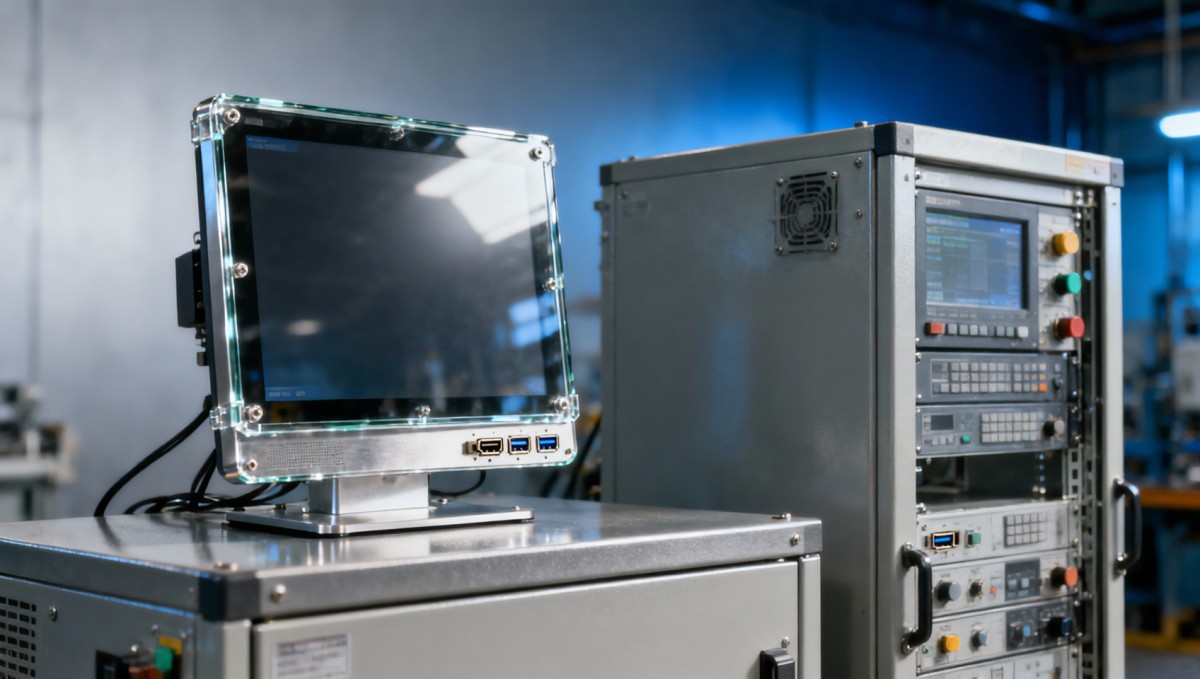
The first step is not screen size. It is the operating context. In industrial projects, a 10.1-inch panel for a compact control cabinet, a 15.6-inch touchscreen for machine HMI, and a 21.5-inch display for a vision station may all be correct choices depending on operator distance, glove use, ambient light, vibration, and mounting depth. A custom industrial touchscreen monitor should therefore begin with a use-case map rather than a product brochure.
For information researchers and procurement teams, the practical challenge is separating functional requirements from marketing language. TechStat Vanguard follows a data-first approach: define measurable conditions, list integration boundaries, and evaluate what failures would cost in lost output, delayed commissioning, or field replacement. That is how engineering teams cut information noise and build a specification that suppliers can quote accurately.
A useful starting frame is to document 4 core inputs: operating environment, display requirements, touch interaction, and system interfaces. In many projects, this simple structure removes 60%–70% of avoidable back-and-forth during supplier evaluation because technical teams stop asking for “rugged monitor” in general terms and start asking for exact brightness range, touch method, ingress level, and connector type.
The minimum requirement set to capture in phase one
Before contacting an hmi panel supplier or industrial display integrator, prepare a requirement sheet covering installation method, operating hours, expected lifecycle, local compliance needs, and the host device interface. If the monitor will run 16–24 hours per day, be mounted on mobile equipment, or work in washdown or dusty production zones, those conditions should be written into the specification from day one.
- Environment: indoor cabinet, factory floor, outdoor kiosk, vehicle, marine, medical, or semi-open station; note temperature range, dust, moisture, oil mist, and vibration exposure.
- Human interaction: bare finger, glove touch, stylus use, multi-user access, frequent cleaning, and whether accidental touch rejection matters.
- Integration: HDMI, VGA, DVI, DP, USB touch, serial control, power input range, cable length, and mounting cutout constraints.
- Lifecycle: pilot build, small batch, or long-run deployment; typical industrial programs may need 3–5 years of stable supply or a documented replacement path.
This discipline matters because a custom industrial touchscreen monitor often sits at the intersection of operator usability and system reliability. A display that looks correct in a showroom can still fail in a plant if the front bezel traps liquid, the USB touch line is sensitive to interference, or the backlight is underspecified for daytime visibility. Spec writing should capture both intended performance and expected stress conditions.
Which technical parameters matter most in real industrial applications?
Once the application is defined, the next task is parameter prioritization. Not every project needs the same balance of brightness, contrast, sealing, or touch sensitivity. A panel on a packaging machine may prioritize glove operation and IP-rated front sealing, while a logistics terminal may prioritize wide-angle readability and low-maintenance projected capacitive touch. Engineers should focus on what affects field performance, not just catalog visibility.
In practice, 6 parameter groups usually determine whether a custom industrial touchscreen monitor integrates cleanly: display size and resolution, luminance and optical bonding options, touch technology, enclosure and front-panel protection, interface compatibility, and power design. If any one of these is vague, the project may face delays during mechanical integration, EMC testing, or on-site operation.
The table below helps procurement teams and technical evaluators align on measurable values rather than broad claims. It is particularly useful when comparing an hmi panel supplier with a fanless industrial computer factory offering bundled display solutions.
A well-built specification uses these ranges as discussion anchors, not generic defaults. For example, selecting 800-nit brightness without checking thermal load, anti-glare treatment, and actual viewing angle may increase cost without solving readability. TSV’s approach is to link every parameter to operating evidence, integration constraints, and maintenance impact.
Display and touch choices that often change the result
Projected capacitive touch is often preferred for modern industrial HMIs because it supports a cleaner front surface, strong visual appearance, and multi-touch operation. However, resistive touch may still be practical in environments where operators wear thick gloves, use simple point interaction, or need dependable input with water droplets present. The right choice is contextual, not trend-driven.
Short decision guide
- Choose projected capacitive touch when UI gestures, smooth glass surface, and contemporary operator experience are important.
- Choose resistive touch when single-point input, broader glove tolerance, and lower complexity matter more than visual refinement.
- Request anti-glare or anti-reflective treatment when the monitor is installed near overhead lighting, windows, or polished metal equipment.
- Check viewing angle and brightness together; a bright screen with poor off-axis readability may still frustrate operators.
In many industrial deployments, the monitor is viewed from 0.5–1.5 meters away and from side angles during machine adjustment, inspection, or line supervision. That is why optical clarity, bezel design, and touch response consistency should be validated together rather than as isolated purchase line items.
How do you match the monitor design to the installation environment?
A custom industrial touchscreen monitor is only as good as its fit to the environment. Industrial buyers often focus on front-panel appearance and overlook mechanical realities such as rear clearance, cable bend radius, grounding points, and enclosure heat buildup. Those oversights can turn a straightforward display purchase into a redesign of the control cabinet or operator station.
At minimum, specification teams should define 5 environmental variables: temperature range, ingress exposure, shock or vibration, EMI conditions, and cleaning method. For example, a monitor placed beside motors, VFDs, or switching power equipment may need better shielding and more careful cable routing than a monitor mounted inside a quiet indoor enclosure. A procurement document should mention these risks clearly.
The next table is useful when comparing common industrial scenarios. It helps engineering, sourcing, and operations teams agree on when standard monitor configurations are sufficient and when a custom design is justified.
The key insight is that “industrial” is not one environment. A monitor specified for a clean automation cell may not survive in a washdown line or forklift terminal. Teams that define scenario-specific conditions early typically shorten review cycles by 1–2 rounds because suppliers can propose exact housing, touch, and interface combinations instead of broad alternatives.
Mechanical and electrical checks many teams miss
Mechanical integration failures are common when teams skip the details. Check front cutout tolerance, mounting clip access, gasket compression, and whether the connector side requires 30–80 mm of extra clearance behind the panel. These are simple checks, but they often decide whether installation is smooth or disruptive.
Recommended site checklist
- Measure usable installation depth, not only nominal cabinet depth.
- Confirm connector type and cable routing direction before panel opening is finalized.
- Review grounding, shielding, and USB touch cable routing in electrically noisy cabinets.
- Verify cleaning chemicals and maintenance frequency if the front panel will be wiped every shift or every day.
- Define whether spare units need drop-in replacement compatibility across 2–3 future procurement cycles.
This is exactly where data-driven review adds value. Instead of asking whether a monitor is “robust,” ask whether the front face meets the required ingress level, whether the power input suits the system bus, and whether the installation geometry supports service access without removing adjacent components.
How should buyers compare suppliers, cost, and customization scope?
For purchasing teams, the challenge is rarely finding a supplier. The challenge is finding a supplier whose engineering response matches the project risk. A low quote may exclude optical treatments, custom cutouts, stable panel sourcing, or interface validation. A higher quote may include long-lifecycle components, documentation support, and integration alignment with a fanless industrial computer factory or industrial motherboard oem partner.
A disciplined comparison should examine 5 procurement dimensions: configuration fit, engineering responsiveness, lifecycle continuity, documentation quality, and lead-time realism. For custom builds, lead times often fall into 2 broad bands: a shorter cycle for minor cosmetic or connector changes, and a longer cycle for enclosure rework, touch stack changes, or new tooling. Buyers should request these distinctions in writing.
The matrix below can be used during RFQ review. It helps teams compare supplier proposals without reducing the decision to unit price alone.
This comparison approach is especially useful for enterprise decision-makers who need to balance engineering risk with commercial discipline. A monitor is rarely purchased as a standalone object. It is purchased as part of a system with service requirements, qualification timelines, and uptime targets.
Common cost drivers and realistic alternatives
Cost is usually shaped by 4 factors: screen size, touch technology, enclosure complexity, and brightness or optical enhancement. Custom logos alone are not the main issue. More often, costs rise when the project needs a non-standard housing, high-brightness panel, wide-voltage input, or specific connector orientation. Buyers should ask which items are standard, which are modified, and which require a new engineering cycle.
- If the application is indoor and fixed-angle, a moderate brightness panel may be more cost-efficient than paying for outdoor-class luminance.
- If the host platform already includes a verified touch controller stack, preserving that interface can lower integration risk and software rework.
- If cabinet space is tight, a purpose-built slim monitor may cost more upfront but prevent mechanical redesign costs later.
The best purchasing decision is rarely the cheapest monitor quote. It is the option that produces the lowest total project friction across specification review, sampling, installation, maintenance, and replacement planning.
What compliance, testing, and implementation steps should be planned?
Industrial display projects often stall because teams discuss hardware features before clarifying qualification steps. Even when a monitor itself is not a highly regulated end product, the project may still need attention to EMC behavior, electrical safety expectations, ingress protection, material choices, or interface stability under long operating cycles. These checks should be aligned early with the final equipment use case.
A practical implementation plan usually includes 4 stages: requirement freeze, sample review, system integration, and pilot validation. Depending on customization depth, the sample and integration phase may take 2–6 weeks or more. For teams working under compressed launch windows, that timeline should be built into the sourcing plan rather than treated as an afterthought.
Implementation flow that reduces specification risk
- Freeze the requirement sheet: screen size, touch type, interface, mount method, front protection, and power input.
- Review mechanical drawings and cable layout: confirm panel cutout, rear clearance, and service access.
- Test a sample with the real host system: verify video compatibility, USB touch response, and ambient readability.
- Run pilot deployment checks: evaluate cleaning routine, operator feedback, and stability over repeated shift use.
For enterprise procurement teams, the main benefit of this phased approach is predictability. It converts a subjective purchasing conversation into a controlled acceptance path. That is very consistent with TSV’s engineering philosophy: tolerances, interfaces, and test conditions should guide the decision, not vague claims about toughness or premium quality.
FAQ: the questions buyers and engineers ask most often
How do I choose between a standard industrial monitor and a custom one?
Choose a standard model when your installation, interface, and environmental conditions fit common ranges with little modification. Choose a custom industrial touchscreen monitor when you need a specific cutout, branded front, unusual power input, specialized brightness target, or a touch solution aligned to glove, cleaning, or environmental demands. Customization becomes more valuable when avoiding one cabinet redesign saves more than the display cost delta.
What should procurement ask in the first supplier call?
Ask for 5 items immediately: available sizes, touch options, interface set, front protection level, and expected lead-time split between sample and volume production. Also request mechanical drawings and a clear statement on lifecycle handling. If a supplier cannot answer these basics clearly, comparison becomes difficult and risk rises.
How long does a custom monitor project usually take?
It depends on customization scope. Minor interface or cosmetic changes may move faster than a project requiring enclosure changes, new front tooling, or special optical treatment. The safest planning method is to separate drawing confirmation, sample preparation, and volume scheduling into visible milestones so internal teams can align launch timing and approval gates.
What is the most common specification mistake?
Many teams underdefine the environment. They specify monitor size and resolution but do not define glare, glove use, cleaning chemicals, or rear-space limitations. As a result, the selected product may power on successfully but still create usability, maintenance, or fitment issues after installation.
Why work with a data-driven technical partner when defining your monitor spec?
In hard-tech procurement, the real cost of a poor specification is not only the display price. It is the engineering rework, delayed commissioning, field replacement, and supplier re-qualification that follow. That is why TechStat Vanguard approaches industrial display specification through verified parameters, integration logic, and realistic operating conditions instead of broad sales language.
For researchers, TSV helps translate fragmented product data into a cleaner comparison framework. For operators and implementation teams, TSV highlights usability and maintenance factors that affect daily performance. For procurement managers and enterprise decision-makers, TSV supports a more disciplined path from requirement sheet to supplier shortlist, sample review, and commercial negotiation.
If you are evaluating a custom industrial touchscreen monitor for machine HMI, embedded control, logistics terminals, or integrated IPC platforms, you can consult on concrete issues rather than generic sales requests. Useful starting topics include parameter confirmation, touch technology selection, brightness target, front-panel protection, connector layout, host compatibility, sample planning, and expected delivery window.
What you can discuss with us next
- Spec sheet review for a new industrial touchscreen monitor project or an existing redesign.
- Comparison of options from an hmi panel supplier, fanless industrial computer factory, or industrial motherboard oem ecosystem.
- Parameter confirmation for screen size, brightness, touch method, sealing, and power input.
- Discussion of sample support, customization scope, qualification checkpoints, and delivery planning.
- Evaluation of lifecycle continuity and replacement strategy for multi-year industrial deployments.
When the goal is reliable industrial integration, the right next step is a technical conversation built around operating conditions and measurable requirements. Share your target application, installation constraints, interface needs, and project timeline, and the discussion can move directly toward a practical specification, not another round of marketing noise.
Search News
Hot Articles
- Carbon Fiber StructuresHow to Specify Aerospace Carbon Fiber Assemblies for Lightweight, Load-Bearing PartsJul 11, 2026
- Machine VisionXiaomi, Alibaba DAMO Academy Drive Open-Source Robotics Model Ecosystem, Lowering Algorithm Development Barriers for Overseas SMEs Adopting Chinese Robotics SolutionsMar 30, 2026
- Cobots & ArmsShanxi 'AI+' Conference Showcases Embodied Intelligence with Multinational Buyer Engagement: Key Industry ImplicationsMar 30, 2026
Popular Tags
Recommended News
 Jul 11, 2026How to Specify Aerospace Carbon Fiber Assemblies for Lightweight, Load-Bearing PartsAerospace carbon fiber assemblies: learn how to specify laminate design, load data, joining methods, and inspection controls for lighter, reliable load-bearing aerospace parts.Elena Rostova (UAV Systems Researcher)
 Mar 30, 2026Xiaomi, Alibaba DAMO Academy Drive Open-Source Robotics Model Ecosystem, Lowering Algorithm Development Barriers for Overseas SMEs Adopting Chinese Robotics SolutionsXiaomi & Alibaba DAMO Academy's open-source robotics models lower algorithm barriers for global SMEs. Boost efficiency in manufacturing, logistics & smart retail with ROS 2 compatible solutions.TSV Data Lab
 Mar 30, 2026Shanxi 'AI+' Conference Showcases Embodied Intelligence with Multinational Buyer Engagement: Key Industry ImplicationsShanxi 'AI+' Conference highlights embodied intelligence with Tesla, Ubtech & Jiantao showcasing multimodal robotics. 40+ global buyers validated tech on-site, creating new B2B channels for industrial automation & AI solutions.Chen Wei (Automation Lead Engineer)
 Mar 30, 2026Zhongguancun Unveils 6G Integrated Sensing-Computing-Intelligence Platform to Empower Embodied Robots for Global Industrial ApplicationsZhongguancun's new 6G platform revolutionizes industrial robotics with <10ms latency, empowering global automotive, logistics & port automation. Discover how this tech boosts China's smart manufacturing exports.TSV Data Lab
 Mar 30, 2026Mech-Mind Tianjin Embodied Intelligence R&D and Production Base Goes Live, Cutting Delivery Time by 20%–30% for Global Customized AMR+Vision SolutionsMech-Mind's Tianjin AMR+Vision production base cuts delivery time by 20%-30% for欧美 & Latin American markets. Discover how this PLd-certified facility accelerates customized robotics solutions for smart manufacturing and logistics.Chen Wei (Automation Lead Engineer)
 Mar 30, 2026Boao Forum Reveals 'Co-evolution of Big and Small Brains' Trend in Humanoid Robots, China's Embodied Intelligence Accelerates Adaptation to Overseas Manufacturing Service ScenariosDiscover how China's humanoid robots, featuring 'Co-evolution of Big and Small Brains,' are revolutionizing global manufacturing. Learn about Embodied Tian Gong 3.0's ISO compliance and overseas deployment at Boao Forum 2026.Chen Wei (Automation Lead Engineer)
 Mar 30, 2026China Railway Industrial Secures Patent for Embodied Robotics in Material Handling, Boosting High-Precision Delivery Capabilities for Overseas Infrastructure and Manufacturing ProjectsChina Railway Industrial's new patent for embodied robotics in material handling boosts high-precision delivery for global infrastructure & manufacturing. Discover how this innovation enhances logistics accuracy in automotive, rail transit & EPC projects.Chen Wei (Automation Lead Engineer)
 Oct 18, 2026Comparing Material Options for Procurement: Specs, Costs, and Supply RisksExplore procurement oriented technical content on material options, specs, costs, and supply risks. Compare alternatives to cut hidden expenses and make confident sourcing decisions.Dr. Marcus Vance
 Oct 17, 20265-Axis CNC Positioning Accuracy: How to Interpret ISO 230-2 Test ResultsAssess 5 axis CNC machining positioning accuracy with ISO 230-2. Learn to interpret repeatability, reversal error, and test conditions to compare suppliers and make confident acceptance decisions.Dr. Marcus Vance
 Oct 16, 2026Choosing a Rugged Edge AI Box Supplier: Thermal Tests and Lifecycle SupportChoose a rugged edge AI box supplier with proven thermal performance and reliable lifecycle support. Discover the tests and commitments to verify before you buy.TSV Data Lab
 Oct 15, 2026R&D Cost Reduction Services: How to Evaluate Fees, Savings, and ROIEvaluate R&D cost reduction services with confidence. Compare fees, verify savings, and calculate ROI without compromising performance. Discover how to choose a provider that delivers real value.Chen Wei (Automation Lead Engineer)
 Oct 17, 2026How Should You Interpret Industrial Robot Repeatability Specs?Decode industrial robot repeatability specifications, understand ISO 9283 test conditions, and avoid costly selection mistakes. Learn how to verify performance for your process.Chen Wei (Automation Lead Engineer)
 Oct 16, 2026How Can You Fairly Compare MTBF Across Industrial Servo Motors?Make a fair industrial servo motor MTBF comparison with matched operating profiles, failure criteria, and confidence bounds. Discover how to assess reliability beyond advertised numbers.Chen Wei (Automation Lead Engineer)
 Oct 15, 2026How Should You Compare TechStat Vanguard 5-Axis CNC Tolerances?TechStat Vanguard 5-axis CNC tolerance comparison: learn how to verify part accuracy, assess inspection evidence, and choose suppliers that reliably meet your drawing requirements.Dr. Marcus Vance
 Oct 14, 2026Drone Frame Composites: Carbon Fiber vs. Fiberglass for Weight and StiffnessExplore drone structural materials composites: compare carbon fiber and fiberglass for weight, stiffness, cost, and antenna compatibility. Find the right material for your drone frame.Elena Rostova (UAV Systems Researcher)
 Oct 13, 2026Smart Cameras vs. PC-Based Machine Vision: Which Fits High-Speed Inspection?This industrial product comparison for machine vision weighs smart cameras vs. PC-based systems on latency, throughput, and cost. Discover your best fit for high-speed inspection.TSV Data Lab
 Oct 12, 2026How to Verify RoHS Compliance in Industrial Sensing Systems Before DeploymentRoHS compliant sensing systems: learn how to verify materials, supplier declarations, testing, and configuration controls before industrial deployment.TSV Data Lab
 Oct 11, 2026How Procurement-Oriented Content Taxonomy Improves B2B Buying JourneysProcurement-oriented content taxonomy streamlines B2B buying journeys with clearer evidence, supplier comparisons, risk visibility, and faster approvals.TSV Data Lab
 Oct 10, 2026How to Select a Machine Performance Monitoring Platform for OEE and Downtime ReductionMachine performance monitoring platform selection guide: validate machine states, OEE data, downtime reasons, integrations, and scalability to reduce losses with confidence.TSV Data Lab
 Oct 08, 2026How to Machine Inconel 625 Blades Without Heat Cracks or Edge ChippingInconel 625 blade machining guide: prevent heat cracks, edge chipping, chatter, and work hardening with proven tooling, cooling, fixturing, and inspection strategies.Dr. Marcus Vance
 Oct 07, 2026How to Evaluate an HMI Panel Distributor for Industrial Automation ProjectsHMI panel distributor evaluation guide: verify technical compatibility, traceability, supply reliability, lifecycle support, and total cost for automation projects.Victor Lin (Chief Software Architect)
 Oct 06, 2026Navigation Fault Tolerance Standards for AMRs: What Safety Teams Must VerifyNavigation fault tolerance standards: learn what AMR safety teams must verify, from localization loss and sensor faults to stopping distance, safe restart, and site-specific validation.Chen Wei (Automation Lead Engineer)
 Oct 05, 2026Calculating Edge Computing Total Cost of Ownership Across Distributed SitesEdge computing ownership cost explained: calculate deployment, energy, connectivity, security, remote support, and refresh costs across distributed sites.TSV Data Lab
 Oct 04, 2026CAD/CAM Benchmarking in the GCC: What Manufacturers Should Ask a ConsultantCAD CAM benchmark consultant GCC guide: learn the key questions manufacturers should ask to validate post-processors, workflows, machine performance, and production risk.Victor Lin (Chief Software Architect)