How to Set a Safe Cobot Torque Threshold for Collaborative Robot Applications
Publication Date
author
Start with the contact scenario, not the robot menu
A safe cobot torque threshold is not something you pull from a default setting screen and call done. In practice, it is one of the few parameters that directly shapes both operator exposure and process behavior. Set it too high and you create unnecessary impact risk. Set it too low and the robot trips constantly, operators start bypassing safeguards, and the line becomes less safe in real use than it looked on paper.
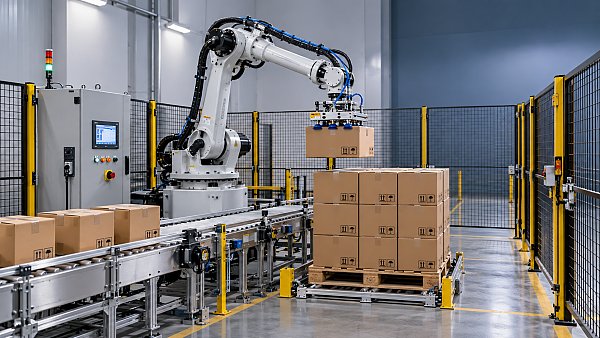
For quality teams and safety managers, the useful question is simple: under what exact contact condition must this robot stop, reduce force, or stay out of reach entirely? That question has to be answered at the application level. A pick-and-place cell handling cartons is one thing. A screwdriving station with a long tool, sharp fixture edges, and hard clamping points is another. The same cobot can be acceptable in one case and poorly configured in the other.
If you are setting a cobot torque threshold for a collaborative robot application, work through the checklist below in order. It follows the way problems usually show up on the floor, not the way brochures describe the machine.
Check whether the application is truly collaborative
This is where many teams lose time. They assume that because the machine is a cobot, every task inside the cell should be run in collaborative mode. That is not a technical rule. Collaboration depends on the task, the tool, the payload, the approach speed, and whether body parts can be trapped between the robot and a fixed object.
- Does the operator share space with the robot during automatic motion, or only during loading and clearing?
- Is there a sharp, hot, abrasive, or rotating end effector that changes the injury mechanism?
- Can contact happen against a rigid edge, nest, conveyor frame, or vise, creating a crushing or pinching point?
- Does the application involve wrists, fingers, forearms, shoulders, or the head entering the working envelope?
If the hazard comes mainly from tooling or trapped-space geometry, lowering the torque threshold alone will not make the station acceptable. That usually means you need a different control method for that step: reduced speed, guarded motion, restricted zones, two-mode operation, or physical separation.
Define the body region and contact type you are protecting against
A lot of bad threshold settings come from treating “human contact” as one generic event. It is not. A forearm bump during carton handling is different from finger compression near a fixture. Transient contact is different from clamping contact. A shoulder can tolerate conditions that a hand cannot.
Before touching the robot settings, write down three things for each interaction zone:
- The body area most likely to be exposed.
- Whether the likely event is impact, compression, or trapping.
- Which fixed surface or tooling feature creates the worst case.
This matters because a torque threshold that looks conservative in free-space collision testing may still be too permissive in a pinch condition. Safety decisions should be tied to the real contact mechanics, not to a generic “collision sensitivity” label in the software.
Separate joint torque threshold from actual contact force at the tool
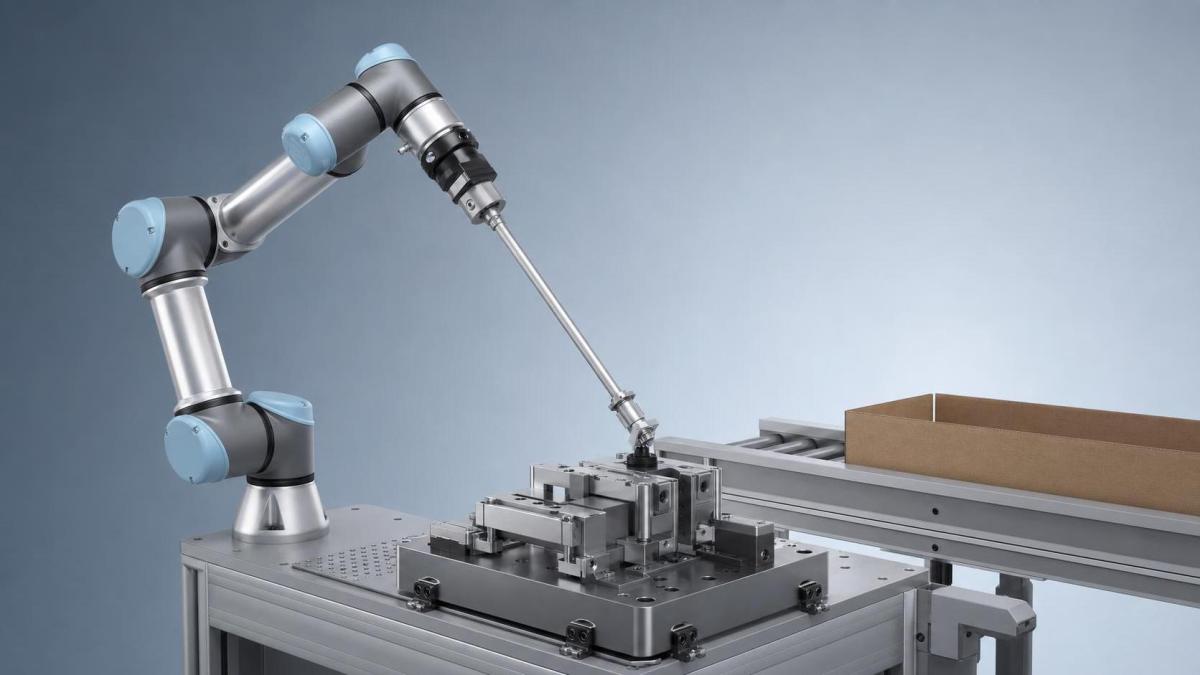
This is one of the biggest practical mistakes. The cobot torque threshold is not the same thing as the force a person feels at the contact point. Joint torque is only one part of the picture. Real contact force changes with arm posture, lever length, payload position, tool inertia, acceleration, and the stiffness of whatever the robot hits.
In other words, you cannot say “we set the threshold to X, therefore the contact force is safe” unless you have tested that statement in the actual application geometry. A long screwdriver, glue nozzle extension, or vacuum gripper finger can amplify what happens at the point of contact. A compact end effector can behave very differently under the same joint-level setting.
Treat torque threshold as a control input that must be validated against measured or demonstrated behavior. Do not treat it as a direct safety result.
Review the documents that actually govern the setting
You need more than the HMI manual. For most collaborative robot risk reviews, the useful document set includes the robot manufacturer’s operating manual, the safety function description, the integrator risk assessment, the end-effector specification, and the cell layout showing restricted zones and operator positions.
For standards work, teams commonly map their review to the collaborative operation requirements and risk assessment framework used for industrial robot systems. The point is not to copy standard text into a file. The point is to check whether the chosen threshold matches the documented mode of use, limits of the safety functions, and the exact tool/payload combination installed on the arm.
Build the threshold around the worst realistic posture
Do not validate only in the easiest pose to test. The robot arm will not behave the same way across its full envelope. Near full extension, with a high moment arm and a loaded tool, contact response can be sharper or slower to arrest than in a compact posture near the base.
A useful shop-floor method is to identify the two or three poses that combine these factors:
- highest reachable speed in shared space,
- longest tool or payload offset,
- closest proximity to fixed fixtures or guarding edges,
- most awkward operator reach-in path during normal work or fault recovery.
If the chosen cobot torque threshold only works in a neutral test pose, it is not ready for signoff.
Test with production motion, not bench-top motion
Another common failure: the setting is tuned at low speed during commissioning, then the real cycle adds sharper accelerations, shorter blends, different payloads, or a more aggressive recovery path. Suddenly the robot either nuisance-stops all day or reacts later than expected.
When you validate the torque threshold, include the motions that operators will actually be exposed to:
- normal automatic cycle,
- part present and part missing conditions,
- restart after e-stop or protective stop,
- manual recovery and homing,
- tool wear or product variation that changes insertion force.
Quality managers usually see this first as instability: false trips cluster around one transition or one SKU. Safety managers see the second-order problem: operators start predicting the stop and leaning deeper into the cell. That is exactly when a marginal threshold becomes a risk issue.
Watch for hidden force multipliers
The robot may be collaborative; the surrounding process may not be. A few details routinely distort the result:
- Rigid fixtures: They turn a mild bump into compression.
- Tool extensions: They increase leverage and localize contact.
- Sharp geometry: Pressure concentration matters, not just total force.
- High-friction contact surfaces: They reduce slip and increase trapping potential.
- External process forces: Press-fit, screwdriving, deburring, sanding, and dispensing can mask abnormal contact until too late.
If any of those are present, the right response may be to redesign the tool, soften the contact surface, change the path, or add a separation measure. It is rarely solved by threshold tuning alone.
Record what “acceptable” means before the test starts
Teams get into trouble when they tune until the cell “feels okay.” That is too subjective for a release decision. Set acceptance criteria in advance. For example: which motions must trigger a stop on contact, which tasks may continue with force-limited behavior, which zones require reduced speed, and what count of nuisance protective stops becomes operationally unacceptable.
Write those criteria into the validation record tied to part number, tool revision, payload range, and software version. If any of those change later, the threshold review should reopen automatically. Without that traceability, the setting drifts from one production state to another and nobody can explain why the original approval was granted.
Do not approve the setting without operator-side observations
A purely engineering validation can miss the way people actually interact with the station. Operators reach in diagonally, steady a part with one hand, clear jams from the side, or enter the cell earlier than the procedure assumes. That changes exposure completely.
During trial runs, watch for hesitation, flinching, repeated nuisance stops, manual workarounds, and any habit that brings the body closer to fixed pinch points. Those are signals that the configured cobot torque threshold may be technically functional but operationally weak. A setting that only works when everyone follows an idealized motion pattern is not a stable control.
Recheck after any meaningful change
Thresholds age badly when the application changes around them. Revalidation is usually warranted when you change the gripper, add a longer bit or nozzle, shift the payload range, alter acceleration, modify the fixture, update firmware, or introduce a new recovery routine. Even a small center-of-gravity change can alter contact behavior enough to matter.
A practical trigger list for change control is better than a vague reminder. If the robot, tool, path, speed, payload, fixture, or operator access method changes, the torque threshold should be reviewed against the same documented acceptance criteria used at launch.
Use this order when making the final decision
When a team is under schedule pressure, they often jump straight to parameter tuning. The better sequence is slower by a day and faster over the life of the cell.
- Confirm whether the task should be collaborative at all.
- Map the likely body region, contact type, and trapped-space condition.
- Review robot, tooling, and risk assessment documents together.
- Test the worst realistic postures and real production motion.
- Set acceptance criteria before adjusting the threshold.
- Approve only when safety behavior and production stability both hold.
- Lock the setting to revision control and reopen it on defined changes.
That is the practical standard. A safe cobot torque threshold is not the lowest value that avoids alarms, and it is not the highest value that preserves uptime. It is the value, or range of values, that stays defensible when you tie the setting back to actual contact conditions, real motion, documented risk, and controlled revalidation.
Search News
Hot Articles
- Carbon Fiber StructuresHow to Specify Aerospace Carbon Fiber Assemblies for Lightweight, Load-Bearing PartsJul 11, 2026
- Machine VisionXiaomi, Alibaba DAMO Academy Drive Open-Source Robotics Model Ecosystem, Lowering Algorithm Development Barriers for Overseas SMEs Adopting Chinese Robotics SolutionsMar 30, 2026
- Cobots & ArmsShanxi 'AI+' Conference Showcases Embodied Intelligence with Multinational Buyer Engagement: Key Industry ImplicationsMar 30, 2026
Popular Tags
Recommended News
 Jul 11, 2026How to Specify Aerospace Carbon Fiber Assemblies for Lightweight, Load-Bearing PartsAerospace carbon fiber assemblies: learn how to specify laminate design, load data, joining methods, and inspection controls for lighter, reliable load-bearing aerospace parts.Elena Rostova (UAV Systems Researcher)
 Mar 30, 2026Xiaomi, Alibaba DAMO Academy Drive Open-Source Robotics Model Ecosystem, Lowering Algorithm Development Barriers for Overseas SMEs Adopting Chinese Robotics SolutionsXiaomi & Alibaba DAMO Academy's open-source robotics models lower algorithm barriers for global SMEs. Boost efficiency in manufacturing, logistics & smart retail with ROS 2 compatible solutions.TSV Data Lab
 Mar 30, 2026Shanxi 'AI+' Conference Showcases Embodied Intelligence with Multinational Buyer Engagement: Key Industry ImplicationsShanxi 'AI+' Conference highlights embodied intelligence with Tesla, Ubtech & Jiantao showcasing multimodal robotics. 40+ global buyers validated tech on-site, creating new B2B channels for industrial automation & AI solutions.Chen Wei (Automation Lead Engineer)
 Mar 30, 2026Zhongguancun Unveils 6G Integrated Sensing-Computing-Intelligence Platform to Empower Embodied Robots for Global Industrial ApplicationsZhongguancun's new 6G platform revolutionizes industrial robotics with <10ms latency, empowering global automotive, logistics & port automation. Discover how this tech boosts China's smart manufacturing exports.TSV Data Lab
 Mar 30, 2026Mech-Mind Tianjin Embodied Intelligence R&D and Production Base Goes Live, Cutting Delivery Time by 20%–30% for Global Customized AMR+Vision SolutionsMech-Mind's Tianjin AMR+Vision production base cuts delivery time by 20%-30% for欧美 & Latin American markets. Discover how this PLd-certified facility accelerates customized robotics solutions for smart manufacturing and logistics.Chen Wei (Automation Lead Engineer)
 Mar 30, 2026Boao Forum Reveals 'Co-evolution of Big and Small Brains' Trend in Humanoid Robots, China's Embodied Intelligence Accelerates Adaptation to Overseas Manufacturing Service ScenariosDiscover how China's humanoid robots, featuring 'Co-evolution of Big and Small Brains,' are revolutionizing global manufacturing. Learn about Embodied Tian Gong 3.0's ISO compliance and overseas deployment at Boao Forum 2026.Chen Wei (Automation Lead Engineer)
 Mar 30, 2026China Railway Industrial Secures Patent for Embodied Robotics in Material Handling, Boosting High-Precision Delivery Capabilities for Overseas Infrastructure and Manufacturing ProjectsChina Railway Industrial's new patent for embodied robotics in material handling boosts high-precision delivery for global infrastructure & manufacturing. Discover how this innovation enhances logistics accuracy in automotive, rail transit & EPC projects.Chen Wei (Automation Lead Engineer)
 Oct 29, 2026Shanghai Plan Targets 8,000 Humanoid Robots in Factories by 2028Shanghai's humanoid robot plan targets 8,000 factory deployments by 2028. Explore what it means for smart manufacturing and robot suppliers.Chen Wei (Automation Lead Engineer)
 Oct 29, 2026Aerospace Aluminum Alloy Strength: 2024-T3 vs. 7075-T6 ComparedCompare aerospace aluminum alloy strength in 2024-T3 vs. 7075-T6. Explore fatigue, corrosion, and weight trade-offs to choose the right alloy for your design.Dr. Marcus Vance
 Oct 28, 2026IDC: Global Quadruped Robot Shipments Rise 92.5% in H1 2026 as Volume and Value DivergeGlobal quadruped robot shipments rose 92.5% in H1 2026, according to IDC. Explore what diverging volume and value trends mean for industrial buyers and manufacturers.Chen Wei (Automation Lead Engineer)
 Oct 28, 2026Interpreting Industrial IoT Latency Data for Monitoring and Real-Time ControlInterpret industrial category latency data to assess jitter, deadline misses, and real-time readiness. Learn how to benchmark IIoT systems and choose monitoring and control solutions.TSV Data Lab
 Oct 27, 2026GXO and Agility Robotics Expand Partnership to Accelerate US Humanoid Robot DeploymentGXO and Agility Robotics plan to expand US humanoid robot deployment with Digit 4 in early 2027. Explore warehouse automation plans, service terms and future Digit 5 upgrades.Chen Wei (Automation Lead Engineer)
 Oct 27, 2026Robotic Automation Costs: Budgeting for Equipment, Integration, and MaintenancePlan your robotics automation cost with confidence. Explore equipment, integration, and maintenance expenses, compare quotes, and build a realistic budget for better ROI.Chen Wei (Automation Lead Engineer)
 Oct 26, 2026AMAXiMAL Releases Open-Source TopMod 3D v3 With Claude AIExplore AMAXiMAL’s free, open-source TopMod 3D v3 with Claude AI assistance, topology-based modeling and plywood fabrication tools that connect complex designs to physical builds.Dr. Marcus Vance
 Oct 26, 2026Choosing a SCADA System Integrator Company: PLC Compatibility and Long-Term SupportChoose a scada system integrator company with proven PLC compatibility and reliable long-term support. Discover what to test, compare, and require before investing.Victor Lin (Chief Software Architect)
 Oct 25, 2026Hesai Leads Global ADAS Main Lidar Shipments in Yole’s 2026 ReportHesai led global ADAS main lidar shipments with a 43% share in 2025, according to Yole’s 2026 report. Explore what this ranking reveals about its automotive market position.TSV Data Lab
 Oct 25, 2026Choosing an Aerospace Materials Manufacturer: Quality and Traceability ChecksChoosing an aerospace materials manufacturer? Learn how to verify certifications, test reports, and lot traceability to qualify suppliers confidently and reduce costly sourcing risks.Dr. Marcus Vance
 Oct 24, 2026Guotai Haitong: Global Entry-Level 3D Printer Shipments Rose 39% in Q1 2026Entry-level 3D printer shipments rose 39% in Q1 2026, Guotai Haitong reports. Explore how AI, multicolor printing and print farms are shaping market growth.Dr. Marcus Vance
 Oct 24, 2026Choosing an Industrial Vision Inspection Supplier: Acceptance Tests That MatterChoose an industrial vision inspection supplier with confidence. Discover acceptance tests for defect detection, false rejects, production speed, and reliable part rejection before you buy.TSV Data Lab
 Oct 23, 2026US Navy Raises Gecko Robotics Contract Ceiling to $300M for Robotic Fleet MaintenanceUS Navy raises Gecko Robotics’ contract ceiling to $300M for Pacific Fleet robotic inspections. Explore potential opportunities for maintenance suppliers and key procurement considerations.Chen Wei (Automation Lead Engineer)
 Oct 23, 2026Choosing Industrial Sensing Systems for Global Plants: Protocol CompatibilityCompare industrial sensing systems international buyers can trust. Explore protocol compatibility, reduce integration risks, and select proven configurations for reliable global plant deployments.TSV Data Lab
 Oct 22, 2026KUKA Showcases Physical AI and iiQKA.AI Vision at NVIDIA GTC BerlinExplore KUKA’s Physical AI showcase at NVIDIA GTC Berlin and discover how iiQKA.AI Vision aims to simplify robotic vision integration and improve 2D and 3D scene recognition.TSV Data Lab
 Oct 22, 2026Robotic Machining of Advanced Composites: What Tolerances Are Achievable?Explore advanced materials machining robotics: discover what drives achievable composite tolerances and how to validate accuracy before investing in your next machining system.Dr. Marcus Vance
 Oct 21, 2026China’s Industrial Robot Exports Near RMB 10 Billion in First Nine Months of 2026China’s industrial robot exports neared RMB 10 billion in January–September 2026, with value rising faster than volume. Explore the data and what it could mean for suppliers.Chen Wei (Automation Lead Engineer)